Bus Traffic Fever Level 106 Answer & Walkthrough Solution

Quick answer
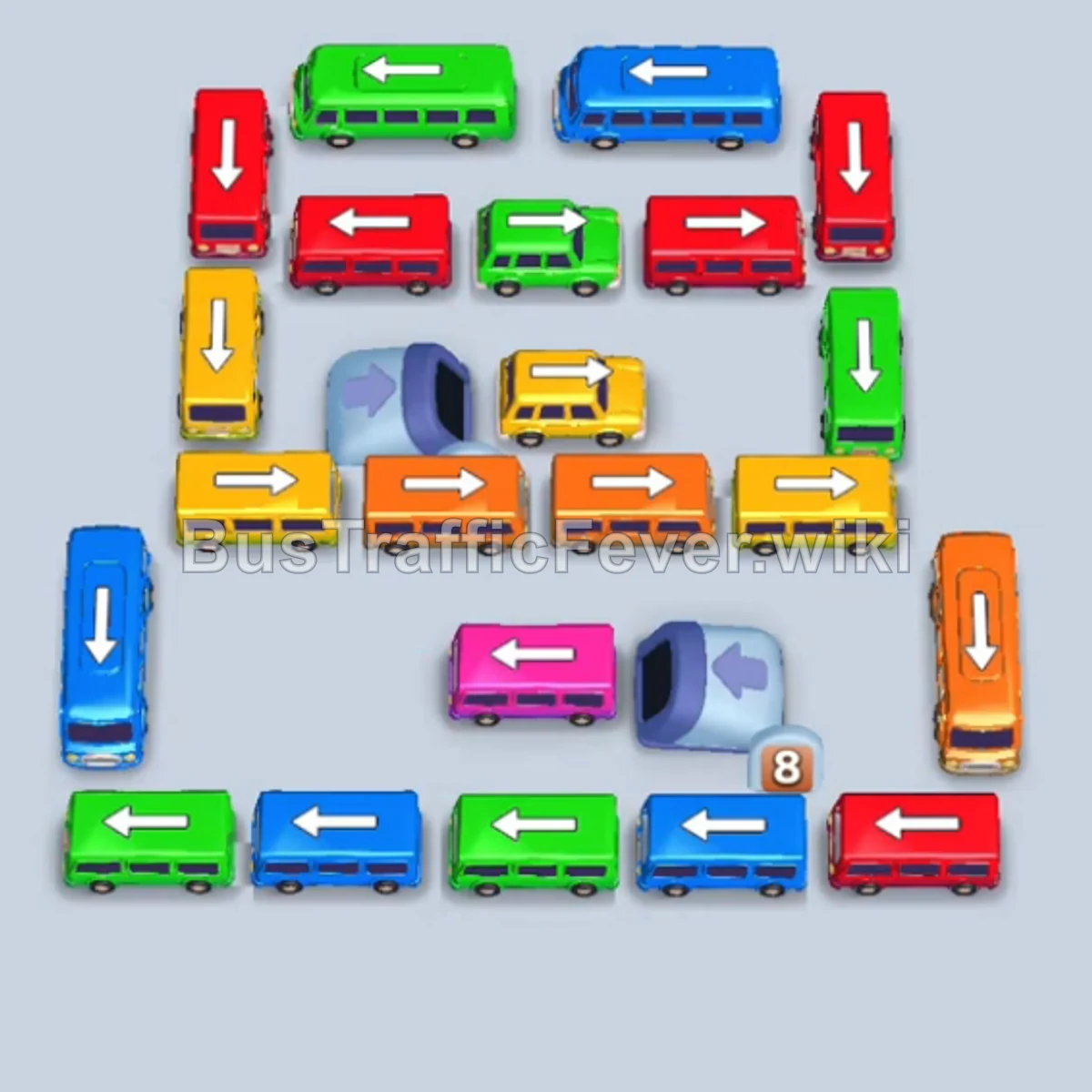
Tap the Green bus on the top-left outer row (facing left) to take the first slot and board Green passengers. Tap the Blue bus on the far-left edge (facing down) to pick up incoming Blue passengers. Tap the long Blue bus on the bottom-left (facing right).
Step-by-step solution
Phase 1: Clearing the Outer Perimeter
- Tap the Green bus on the top-left outer row (facing left) to take the first slot and board Green passengers.
- Tap the Blue bus on the far-left edge (facing down) to pick up incoming Blue passengers.
- Tap the long Blue bus on the bottom-left (facing right). It fills the empty slot and clears the large Blue passenger group.
- Tap the Green bus at the top-left (facing right) to collect the next Green passengers.
- Tap the Pink bus at the bottom-left (facing left) to collect the incoming Pink queue.
- Tap the Green bus at the bottom (facing left) to clear the remaining Green passengers in line.
- Tap the Blue bus at the bottom-center (facing left) to pick up Blue passengers.
- Tap the Blue bus at the top-right (facing left) to clear the remaining Blue passenger wave.
- Tap the Red bus at the top-right (facing down) to board Red passengers.
- Tap the Orange bus on the far-right edge (facing down) to pick up Orange passengers.
Phase 2: Unlocking Inner Lanes & Queue Shifts
- Tap the small Yellow bus in the inner area (facing left) to collect Yellow passengers.
- Tap the Green bus at the top-center (facing right) to pick up Green passengers.
- Tap the Yellow bus in the middle-left lane (facing down) to clear the next Yellow group.
- Tap the long Blue bus at the bottom-center (facing right) to collect the queue of Blue passengers.
- Tap the Red bus on the middle-left (facing right) to clear the Red passengers.
- Tap the small Green bus at the bottom lane (facing right) into a parking slot.
- Tap the Pink bus on the middle-right (facing left) to pick up Pink passengers.
- Tap the Red bus on the outer left (facing down) to board Red passengers.
- Tap the Yellow bus in the middle (facing left) to clear the Yellow group.
- Tap the Orange bus on the bottom-right (facing down) to collect Orange passengers.
Phase 3: Dispenser & Center Layer Unlocks
- Tap the Orange bus in the center-right area (facing left) to pick up the next Orange group.
- Tap the Yellow bus released from the bottom dispenser (facing right) to pick up Yellow passengers.
- Tap the long Pink bus in the center (facing right) to collect the large wave of Pink passengers.
- Tap the Yellow bus in the inner lane (facing left) to clear the Yellow queue.
- Tap the Red bus in the center lane (facing up) to board Red passengers.
- Tap the long Green bus emerging from the dispenser (facing right) to board Green passengers.
- Tap the Red bus at the top-left (facing down) to collect Red passengers.
- Tap the small Green bus in the center (facing right) to board the remaining Green passengers.
- Tap the long Yellow bus in the center (facing right) to clear the large Yellow queue.
- Tap the long Orange bus from the dispenser track (facing right) to collect Orange passengers.
Phase 4: Final Sequence and Cleanup
- Tap the small Green bus released from the dispenser (facing right) to park and pick up Green passengers.
- Tap the small Pink bus released from the dispenser (facing right) to pick up Pink passengers.
- Tap the long Blue bus at the top lane (facing right) to collect the final Blue queue.
- Tap the long Red bus in the middle lane (facing right) to board Red passengers.
- Tap the Red bus in the middle-bottom lane (facing left) into a slot.
- Tap the final Red bus released from the dispenser track (facing left) to clear the last Red passengers and complete Level 106.
Tips for success
- Prioritize Outer Free-Moving Buses: Always clear the perimeter vehicles first to make room for vehicles trapped in the center grid and dispenser paths.
- Manage Dispenser Tracks: Vehicles emerging from the dispenser track (with countdown numbers) block each other; tap them in sequence as soon as their front path clears.
- Keep Slots Open for Large Buses: Long buses carry 40 passengers; ensure you have enough open parking slots so you don’t overflow your holding area while waiting for long queues to board.
More Bus Traffic Fever help
Continue with the Level 105 walkthrough, review the core rules in how to play Bus Traffic Fever, or browse all level solutions to jump to another number.