Bus Traffic Fever Level 318 Answer & Walkthrough Solution

Quick answer
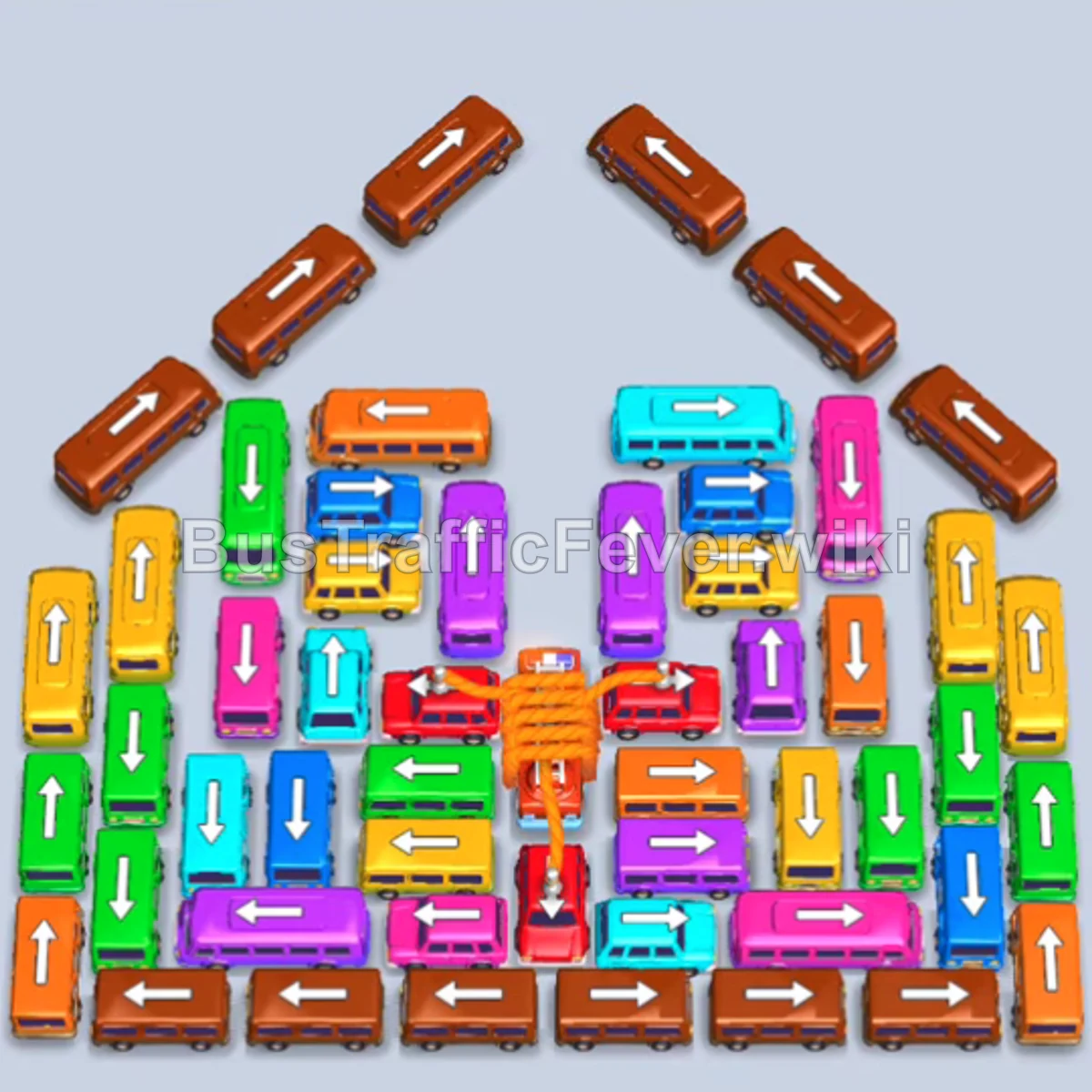
Level 318 features a massive vehicle grid crowned by a roof-like perimeter of diagonal brown buses. The primary challenge is managing only four active parking slots while dealing with long passenger queues dominated by brown, yellow, and green passengers. The key strategy is methodically peeling away the diagonal roof buses and bottom horizontal brown buses to satisfy the initial brown crowd, then selectively releasing smaller buses that match upcoming passenger groups to keep slots circulating without deadlocking.
Step-by-step solution
Phase 1: Clearing the Roof and Outer Brown Buses
- Tap the diagonal brown bus on the upper-left roof ridge (facing northwest) to claim the first parking slot.
- Tap the diagonal brown bus on the upper-right roof ridge (facing northeast) into the second slot.
- Tap the diagonal brown bus on the middle-right roof ridge (facing northeast) into the third slot.
- Tap the small horizontal yellow bus (facing right) in the upper-center to enter the fourth slot and clear the front yellow passengers.
- Tap the small vertical green bus (facing up) in the upper-center as soon as the yellow bus departs.
- Tap the long horizontal brown bus (facing left) along the bottom-left edge; it loops around the track to take the next slot vacated by the first brown bus.
- Tap the diagonal brown bus on the middle-left roof ridge (facing northwest) to replace the departed green bus.
- Tap the long horizontal brown bus (facing right) along the bottom-right edge to fill the next freeing slot.
- Tap the small cyan bus (facing right) on the right edge to pick up incoming cyan passengers.
- Tap the small pink bus (facing right) near the bottom-right corner to board pink passengers.
Phase 2: Opening the Upper Rows and Right Flank
- Tap the small cyan bus (facing left) on the middle-left side once slot space opens.
- Tap the small green bus (facing down) in the upper-left area.
- Tap the diagonal brown bus on the lower-left roof ridge (facing northwest).
- Tap the long vertical yellow bus (facing up) along the far-right edge into an open slot.
- Tap the small horizontal yellow bus (facing right) in the center to support yellow passenger clearance.
- Tap the small horizontal purple bus (facing left) in the lower-center section.
- Tap the diagonal brown bus on the lower-right roof ridge (facing northeast), clearing the last piece of the upper roof structure.
- Tap the small vertical green bus (facing down) on the upper-right flank.
- Tap the small horizontal yellow bus (facing left) in the upper-right area.
- Tap the small horizontal pink bus (facing left) in the upper-middle area.
Phase 3: Clearing Yellow, Purple, and Midfield Buses
- Tap the small horizontal brown bus (facing right) in the lower-middle cluster.
- Tap the vertical cyan bus (facing up) in the middle-left column.
- Tap the small cyan bus (facing right) on the mid-left edge once the blue/cyan queue approaches.
- Tap the small horizontal yellow bus (facing left) in the middle row.
- Tap the vertical cyan bus (facing up) in the center column.
- Tap the long horizontal purple bus (facing right) across the upper-center.
- Tap the small brown bus (facing right) in the center-left.
- Tap the small horizontal pink bus (facing left) near the center.
- Tap the small horizontal brown bus (facing left) along the bottom-center.
- Tap the small purple bus (facing up) in the lower-middle section.
Phase 4: Untangling the Center Grid
- Tap the small red bus (facing right) on the right perimeter.
- Tap the long vertical yellow bus (facing up) along the far-left edge.
- Tap the small vertical green bus (facing down) on the left side.
- Tap the small brown bus (facing left) on the right edge.
- Tap the long vertical brown bus (facing up) along the left edge.
- Tap the small vertical green bus (facing down) along the left column.
- Tap the small horizontal yellow bus (facing right) in the center.
- Tap the small horizontal brown bus (facing left) in the center.
- Tap the small horizontal yellow bus (facing left) in the lower-center.
- Tap the small horizontal purple bus (facing right) in the lower area.
Phase 5: Final Evacuation and Firetruck Exit
- Tap the small cyan bus (facing up) in the center.
- Tap the small horizontal green bus (facing left) in the lower section.
- Tap the small red bus (facing left) in the lower row.
- Tap the small pink bus (facing left) at the bottom.
- Tap the small green bus (facing down) on the left edge.
- Tap the long vertical brown bus (facing up) on the upper-left perimeter.
- Tap the small horizontal purple bus (facing right) near the center.
- Tap the small horizontal pink bus (facing left) at the bottom.
- Tap the small horizontal yellow bus (facing left) in the middle.
- Tap the small horizontal cyan bus (facing right) to clear the last cyan passengers.
- Tap the small horizontal yellow bus (facing left).
- Tap the small horizontal green bus (facing right).
- Tap the small red bus (facing left) to begin clearing the red passenger backlog.
- Tap the central long red firetruck (facing up) into the final available slot to absorb the remaining red passengers and complete the level.
Tips for success
- Manage the 4-slot restriction strictly: With only four active parking bays unlocked, never release a bus whose passenger color is not near the front of the queue unless an existing bus is already actively boarding and about to leave.
- Prioritize the diagonal roof brown buses: The six diagonal brown buses on the upper roof lock the entire top half of the board. Dispatch them during the initial wave of brown passengers to clear room for the inner columns.
- Hold the red firetruck until the end: The large firetruck in the center requires a substantial block of red passengers. Keep it in place until the queue cycles through cyan, green, and yellow passengers so it does not permanently clog a slot.
More Bus Traffic Fever help
Continue with the Level 317 walkthrough, review the core rules in how to play Bus Traffic Fever, or browse all level solutions to jump to another number.