Bus Traffic Fever Level 17 Answer & Walkthrough Solution

Quick answer
Use the embedded walkthrough for the exact order. Clear the vehicles blocking an exit first, then stage the next matching color without filling every parking slot.
Step-by-step solution
Phase 1: Clearing the Top Row & Outer Corners
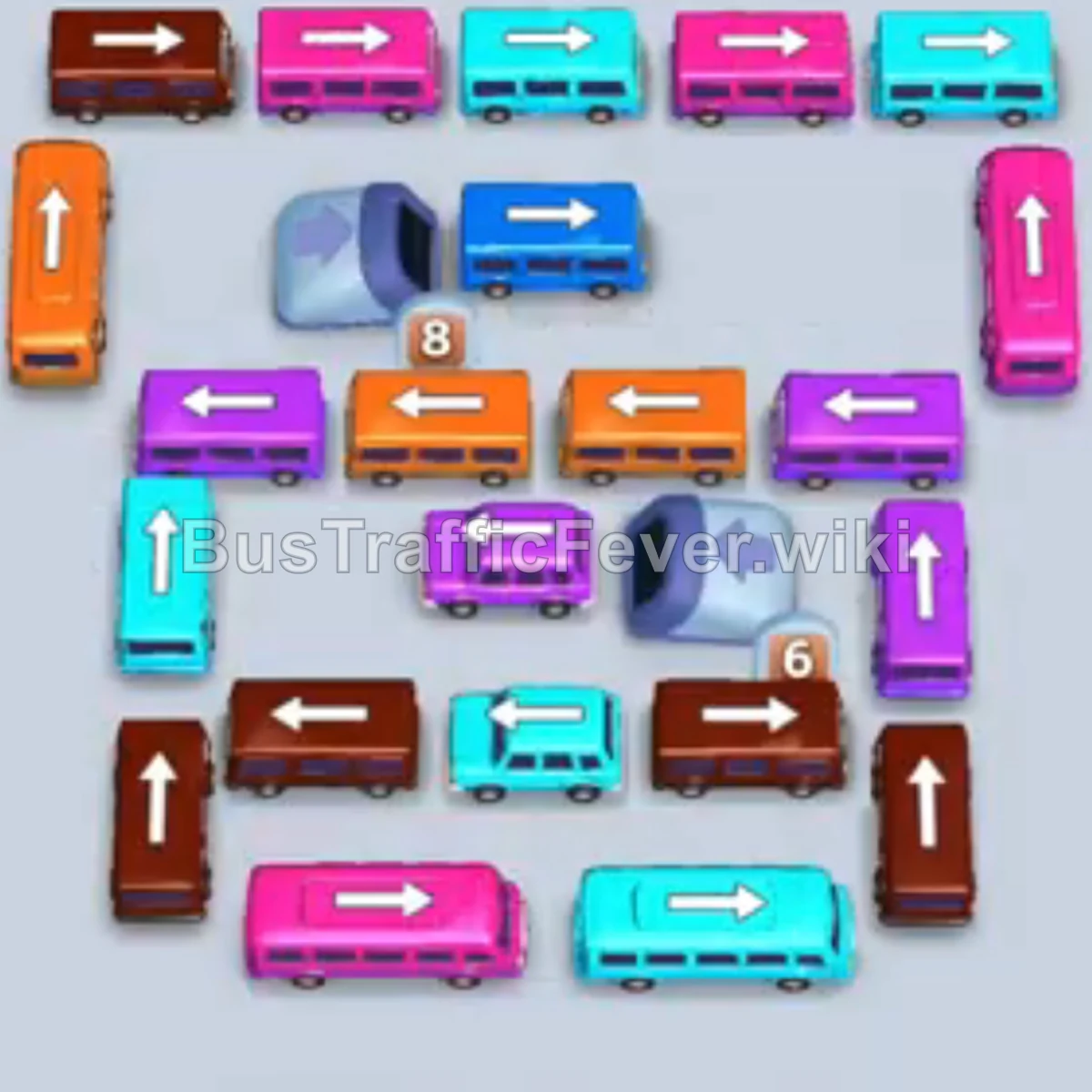
- Tap the Cyan bus on the top row (pointing right). Cyan passengers board and it departs.
- Tap the Pink bus on the upper-right flank (pointing up). Pink passengers board and it leaves.
- Tap the Blue bus on the top row (pointing right). Blue passengers board and it departs.
- Tap the Pink bus along the bottom row (pointing left). Pink passengers board and it leaves.
- Tap the Cyan bus directly below the top row (pointing right). Cyan passengers board and it clears.
- Tap the Cyan bus on the top-right edge (pointing right). Cyan passengers board and it departs.
- Tap the Pink bus emerging near the upper-middle right (pointing right). Pink passengers board and it leaves.
- Tap the Brown bus at the top-left corner (pointing left). Brown passengers board and it departs.
Phase 2: Opening the Left & Right Wings
- Tap the Purple bus in the middle row (pointing left) into slot 1. Purple passengers begin boarding.
- Tap the Orange bus on the top-left vertical column (pointing up) into slot 2. Orange and purple passengers board simultaneously and both vehicles depart.
- Tap the Cyan bus on the left vertical column (pointing up). Cyan passengers board and it leaves.
- Tap the Orange bus in the middle-left row (pointing left) to park in slot 1.
- Tap the Pink bus on the far right (pointing up) to park in slot 2.
- Tap the Purple bus on the far right (pointing left) to park in slot 3. Pink passengers board and the Pink bus departs.
- Tap the Brown bus emerging from the left tunnel dispenser (pointing right). Brown passengers board and it leaves.
- Tap the Cyan bus on the right edge (pointing right). Cyan passengers board and it leaves.
- The Purple bus in slot 3 finishes boarding and departs.
- Tap the Brown bus on the far right edge (pointing up). Brown passengers board and it leaves.
- Tap the Blue bus on the far right (pointing right). Blue passengers board and it leaves.
- Tap the Purple bus on the middle-right (pointing up). Purple passengers board, and both the Purple bus and the parked Orange bus finish boarding and depart.
Phase 3: Unblocking the Tunnel Entrances
- Tap the Blue bus on the far right (pointing right). Blue passengers board and it departs.
- Tap the Purple bus exiting the left tunnel dispenser (pointing right). Purple passengers board and it leaves.
- Tap the Blue bus in the middle-center row (pointing left) into slot 1.
- Tap the Brown bus on the middle-right (pointing right) into slot 2. Brown and blue passengers board, and both vehicles depart.
- Tap the Orange bus in the center row (pointing right) into slot 1.
- Tap the Brown bus in the lower-left row (pointing left) into slot 2. Orange and brown passengers board, and both buses depart.
- Tap the Cyan bus in the lower-right row (pointing right). Cyan passengers board and it departs.
- Tap the Brown bus on the lower-left edge (pointing left) into slot 1.
- Tap the Purple bus on the middle-left (pointing left). Purple passengers board and it departs.
Phase 4: Emptying the Tunnels & Final Cleanup
- Tap the Orange bus on the left edge (pointing left) into slot 2. Orange passengers begin boarding.
- Tap the Cyan bus on the bottom-left (pointing left) into slot 3. Cyan passengers board and it leaves, followed by the Orange bus in slot 2.
- Tap the Cyan bus in the bottom center (pointing right). Cyan passengers board and it departs.
- Tap the Purple bus exiting the left tunnel (pointing right). Purple passengers board and it departs.
- Tap the Pink bus in the bottom row (pointing left). Pink passengers board; the parked Brown bus in slot 1 and the Pink bus both depart.
- Tap the Blue bus on the left (pointing left). Blue passengers board and it leaves.
- Tap the Brown bus exiting the left tunnel (pointing right). Brown passengers board and it leaves.
- Tap the Brown bus in the middle row (pointing left) into slot 1.
- Tap the Brown bus exiting the right tunnel (pointing right) into slot 2. The final brown passengers board both vehicles to achieve Perfect! Level 17.
Tips for success
- Manage the Tunnel Dispensers: Vehicles stored inside the left and right tunnels have countdown numbers. Clearing the vehicles directly in front of them lets the dispensers continuously feed into the matching queue.
- Buffer Long-Haul Buses: Place larger buses into parking slots early when their color group is approaching so they soak up the large passenger clusters without blocking turnaround slots.
- Alternate Wing Clearances: Alternate between freeing left-facing and right-facing outward buses to prevent any single column from bottlenecking.
More Bus Traffic Fever help
Continue with the Level 16 walkthrough or Level 18 walkthrough, review how to play Bus Traffic Fever, or browse all level solutions.