Bus Traffic Fever Level 107 Answer & Walkthrough Solution

Quick answer
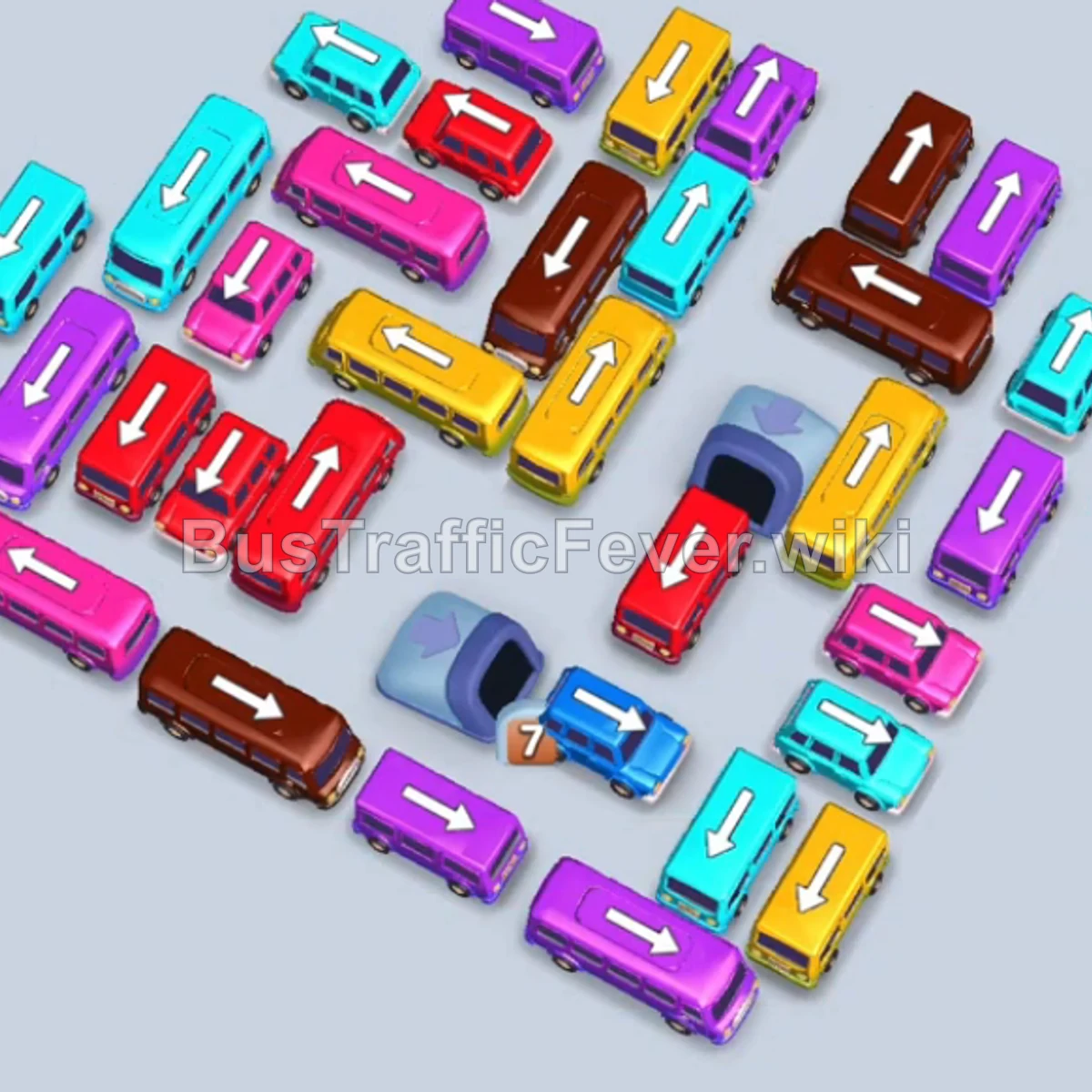
Tap the Purple bus on the middle-left facing left. It enters a parking bay and collects the first wave of purple passengers. Tap the Cyan bus on the top-left to collect cyan passengers. Tap the Purple bus near the top-center facing right to load more purple passengers.
Step-by-step solution
Phase 1: Opening Moves & Clearing Initial Blocks
- Tap the Purple bus on the middle-left facing left. It enters a parking bay and collects the first wave of purple passengers.
- Tap the Cyan bus on the top-left to collect cyan passengers.
- Tap the Purple bus near the top-center facing right to load more purple passengers.
- Tap the Yellow bus on the center-left facing down to park in a slot.
- Tap the Blue bus on the center-right facing up to clear blue passengers.
- Tap the Cyan bus near the top facing right to clear out cyan passengers and allow the parked yellow bus to depart.
Phase 2: Unlocking the Right and Lower Sections
- Tap the Brown bus at the bottom-right facing left.
- Tap the Brown bus at the top-right facing down to pick up brown passengers.
- Tap the Purple bus at the center-left facing down.
- Tap the Cyan bus at the bottom facing left to board cyan passengers.
- Tap the Purple bus near the bottom-left facing left.
- Tap the Pink/Magenta bus at the bottom-left facing up.
Phase 3: Managing Queue Matching & Traffic Flow
- Tap the Red bus on the bottom-left facing up.
- Tap the Purple bus at the top-right facing left to board passengers.
- Tap the second Red bus at the bottom-left facing up.
- Tap the Purple bus on the upper-left grid facing left.
- Tap the Cyan bus at the top facing right to clear passengers.
- Tap the Brown bus near the center facing right.
- Tap the Brown bus at the top facing up to load brown passengers.
- Tap the Pink bus near the center facing left.
- Tap the Yellow bus at the bottom-center facing up.
- Tap the Brown bus on the right facing up.
Phase 4: Clearing the Center Cluster
- Tap the Cyan bus on the top-right facing right.
- Tap the Red bus facing right.
- Tap the Cyan bus on the right facing down.
- Tap the Pink bus in the center facing right.
- Tap the Brown bus at the top-right facing down.
- Tap the Purple bus on the far right facing up.
- Tap the Yellow bus in the center facing left.
- Tap the Brown bus facing right.
- Tap the Yellow bus near the center facing down.
- Tap the Cyan bus at the bottom-right facing right.
Phase 5: Final Clean-up and Completion
- Tap the Red bus in the center facing down.
- Tap the Yellow bus facing right.
- Tap the Pink bus facing left.
- Tap the Cyan bus facing up.
- Tap the Red bus on the left facing up.
- Tap the Brown bus at the bottom center facing up.
- Tap the Pink bus near the bottom facing down.
- Tap the Cyan bus near the bottom facing up.
- Tap the Pink bus in the center facing up.
- Tap the Yellow bus in the center facing down.
- Tap the Yellow bus facing left.
- Tap the Red bus facing up.
- Tap the remaining Yellow bus facing left to pick up the final passengers and complete the level!
Tips for success
- Observe the Queue: Always check the oncoming passenger colors on the track to plan which buses to send next.
- Prioritize Freeing Blocked Routes: Tap smaller buses and outer vehicles that have an open path to clear room for locked-in, high-capacity buses.
- Avoid Parking Gridlock: Ensure you always leave 2–3 open bays so buses aren’t trapped waiting when the passenger queue shifts color.
More Bus Traffic Fever help
Continue with the Level 106 walkthrough, review the core rules in how to play Bus Traffic Fever, or browse all level solutions to jump to another number.