Bus Traffic Fever Level 297 Answer & Walkthrough Solution

Quick answer
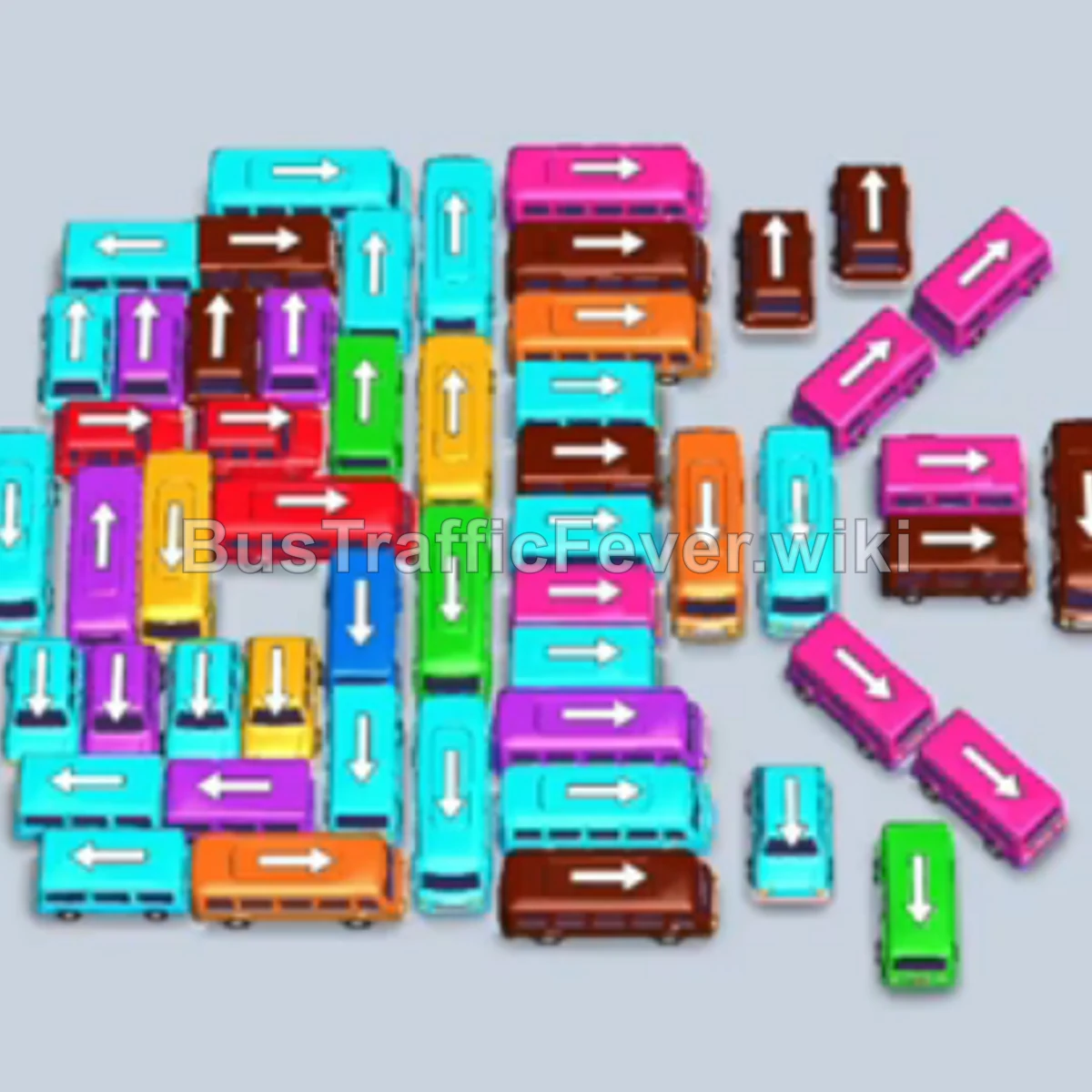
Level 297 features a massive, tightly packed traffic grid and long color waves of passengers. The main challenge is managing the 5 parking bays without causing a gridlock while unblocking buried vehicles. The winning strategy requires pre-staging select vehicles into available bays right before their matching passengers reach the front of the line, while relying on rapid turnovers from standard buses and smaller 4-passenger buses to keep traffic flowing smoothly.
Step-by-step solution
Phase 1: Unlocking the Outer Perimeter
- Tap the horizontal cyan bus at the lower-left. It drives into Bay 1 and immediately loads the initial cyan passengers.
- Tap the vertical green bus in the center-left. It occupies Bay 2 and begins boarding the large green passenger block.
- Tap the horizontal green bus along the lower edge to Bay 3 to stage it for subsequent green passengers.
- Tap the horizontal yellow bus on the lower-left to Bay 4 to prepare for the yellow passenger group.
- Tap the vertical cyan bus on the center-left into Bay 1 once the first cyan bus departs.
- Tap the vertical pink bus on the far right into Bay 2 as soon as the first green bus departs. It boards the pink passengers.
- Allow the cyan passengers to reach the front; the pre-staged cyan bus in Bay 1 fills and departs.
- Tap the horizontal yellow bus in the lower area to Bay 2 to collect the next yellow wave.
- Allow the green passengers to fill the green bus staged in Bay 3 so it can clear out.
- Tap the vertical pink bus on the middle-right to Bay 4 to absorb the incoming pink passengers.
Phase 2: Clearing the Center Cluster
- Tap the small vertical yellow bus near the bottom center into Bay 3.
- Tap the horizontal brown bus in the center into Bay 4 once vacated, boarding the front brown queue.
- Tap the horizontal green bus in the lower-middle into Bay 5.
- Tap the horizontal cyan bus at the bottom into Bay 1 to take the cyan passengers.
- Tap the vertical pink bus on the right into Bay 2.
- Wait for the green passengers to board the green bus waiting in Bay 5 and depart.
- Tap the small vertical yellow bus at the bottom into Bay 4.
- Tap the horizontal brown bus in the lower-center into Bay 1.
- Tap the horizontal yellow bus in the center into Bay 5.
- Board the yellow passenger group into the small buses in Bay 3 and Bay 4, followed by the bus in Bay 5.
- Tap the small brown bus in the lower-right into Bay 3.
- Tap the horizontal pink bus in the lower-center into Bay 4.
- Allow the pink passengers to fill the pink buses in Bay 2 and Bay 4.
- Tap the horizontal cyan bus on the mid-left into Bay 5 to pick up cyan passengers.
- Board the brown passengers into the bus in Bay 1 and the small bus in Bay 3.
Phase 3: Mid-Level Wave Cycling
- Tap the vertical red bus in the lower-right to Bay 2.
- Tap the horizontal red bus near the top-center into Bay 3 to clear the red passenger line.
- Tap the horizontal green bus on the lower-left into Bay 1 to collect the green group.
- Tap the horizontal cyan bus in the center to Bay 4 for incoming cyan passengers.
- Tap the horizontal brown bus in the center into Bay 5.
- Tap the horizontal cyan bus in the center into Bay 2.
- Tap the vertical red bus on the middle-right into Bay 3.
- Tap the horizontal cyan bus in the middle into Bay 4.
- Tap the horizontal yellow bus in the center-left into Bay 1.
- Tap the horizontal cyan bus into Bay 5.
- Tap the horizontal brown bus into Bay 2.
- Tap the vertical red bus into Bay 3.
- Tap the horizontal pink bus into Bay 4.
- Tap the vertical green bus into Bay 1.
- Tap the horizontal cyan bus into Bay 5.
Phase 4: Dismantling the Core Grid
- Tap the vertical red bus into Bay 2.
- Tap the horizontal pink bus into Bay 3.
- Tap the vertical green bus into Bay 4.
- Tap the horizontal cyan bus into Bay 1.
- Tap the horizontal brown bus into Bay 5.
- Tap the horizontal yellow bus into Bay 2.
- Tap the vertical red bus into Bay 3.
- Tap the horizontal pink bus into Bay 4.
- Tap the vertical red bus into Bay 1.
- Tap the horizontal green bus into Bay 5.
- Tap the horizontal yellow bus into Bay 2.
- Tap the horizontal pink bus into Bay 3.
- Tap the horizontal cyan bus into Bay 4.
- Tap the small vertical yellow bus into Bay 1 and the horizontal yellow bus into Bay 5 to clear the yellow passengers.
- Tap the small brown bus into Bay 2 and the horizontal brown bus into Bay 3 to clear the brown passenger block.
Phase 5: Final Vehicle Extraction
- Tap the horizontal pink bus into Bay 4.
- Tap the horizontal green bus into Bay 1.
- Tap the horizontal cyan bus into Bay 2.
- Tap the horizontal yellow bus into Bay 3.
- Tap the horizontal brown bus into Bay 4.
- Tap the horizontal red bus into Bay 5.
- Tap the horizontal pink bus into Bay 1.
- Tap the horizontal yellow bus into Bay 2.
- Tap the horizontal pink bus into Bay 3.
- Tap the horizontal red bus into Bay 4.
- Tap the horizontal brown bus into Bay 5.
- Tap the horizontal pink bus into Bay 1.
- Tap the horizontal cyan bus into Bay 2.
- Tap the horizontal red bus into Bay 3.
- Tap the horizontal cyan bus into Bay 4.
- Tap the horizontal cyan bus into Bay 5.
- Tap the horizontal brown bus into Bay 1.
- Tap the horizontal green bus into Bay 2.
- Tap the horizontal cyan bus into Bay 3.
- Tap the horizontal green bus into Bay 4.
- Tap the horizontal brown bus into Bay 5.
- Tap the horizontal green bus into Bay 1.
- Tap the horizontal pink bus into Bay 2.
- Tap the horizontal purple bus into Bay 3 to collect the newly revealed purple passengers.
- Tap the vertical yellow bus into Bay 4.
- Tap the horizontal brown bus into Bay 5.
- Tap the final vertical cyan bus on the far-left edge into Bay 2 as the last cyan passenger group approaches to finish the level.
Tips for success
- Staging Ahead: Several buses (such as the early green and yellow buses) can sit safely in open bays because upcoming passenger waves will reach them before all 5 bays become filled.
- Prioritize High-Obstruction Vehicles: Tapping long horizontal buses that span across the middle lanes immediately frees up multiple vertical buses blocked above and below them.
- Leverage 4-Passenger Buses: Small buses board very quickly; pair them alongside matching large buses to absorb uneven passenger queues and open up slots rapidly.
More Bus Traffic Fever help
Continue with the Level 296 walkthrough, review the core rules in how to play Bus Traffic Fever, or browse all level solutions to jump to another number.