Bus Traffic Fever Level 264 Answer & Walkthrough Solution

Quick answer
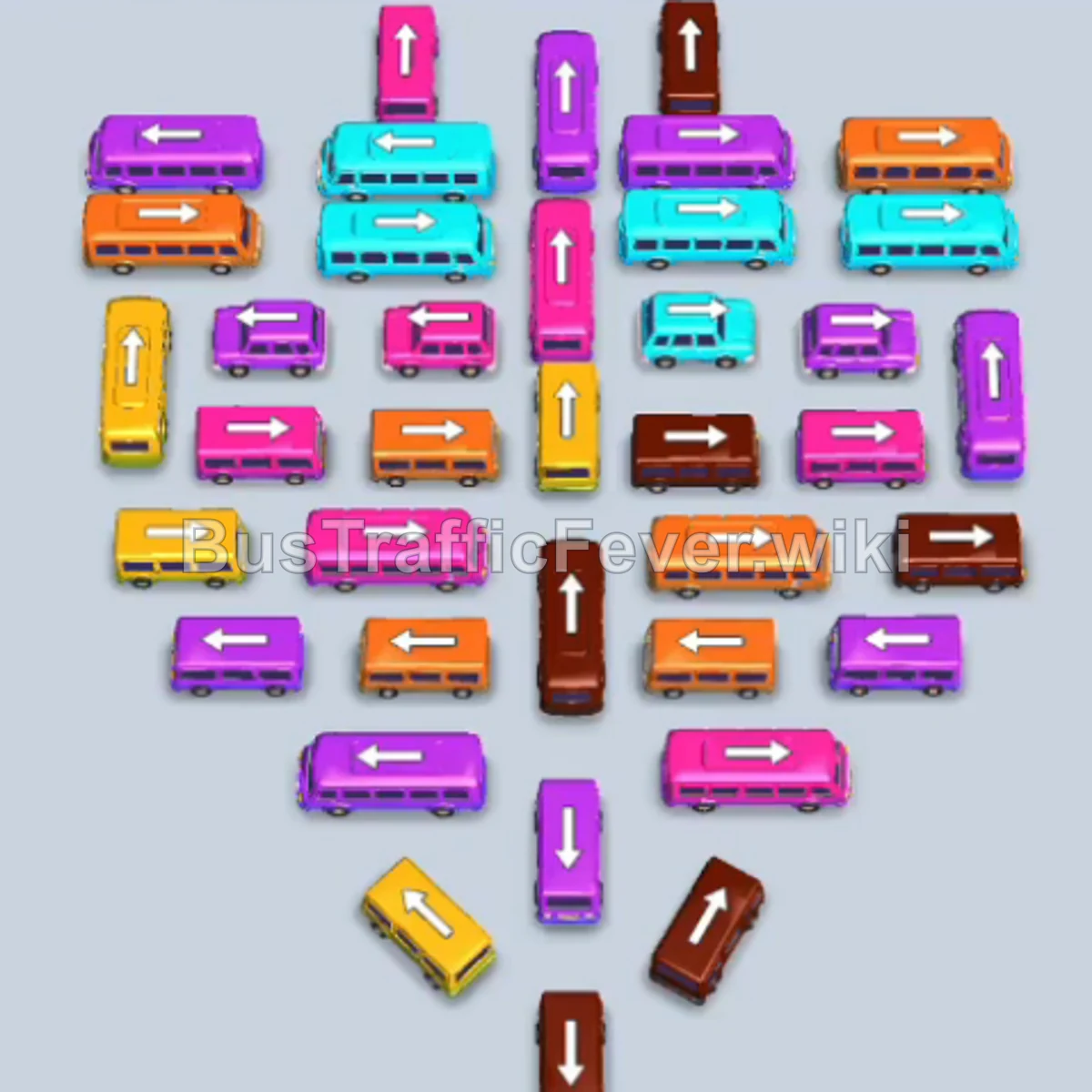
The puzzle presents a dense heart-shaped cluster of buses with five docking bays above and an active passenger queue featuring yellow, orange, cyan, brown, and pink passengers. The key strategy is maintaining open docking bays by sending out outer and center vehicles that directly match the leading passengers in line, systematically peeling away the top and lateral layers to free locked buses deeper in the formation.
Step-by-step solution
Phase 1: Opening the Upper Rows and Initial Passenger Waves
- Tap the vertical orange bus on the mid-left outer edge to park it in Bay 2 and pick up the front-row orange passengers.
- Tap the vertical cyan bus at the top center to park in Bay 3, preparing it for the front cyan crowd.
- Tap the vertical brown bus in the upper center into Bay 2 as soon as the first orange bus finishes loading and leaves.
- Tap the horizontal pink bus on the upper right to occupy Bay 5.
- Tap the horizontal orange bus on the far upper right to park in Bay 3 once the earlier cyan bus departs.
- Tap the vertical brown bus in the upper-mid center to fill Bay 4.
- Tap the vertical orange bus on the left side to move into Bay 1 once the starting yellow bus clears.
- Tap the horizontal pink bus on the upper left into Bay 1 after the orange bus departs.
- Tap the vertical yellow bus on the upper left to park in Bay 2, absorbing the newly exposed yellow passengers.
- Tap the horizontal pink bus below the center into Bay 3.
- Tap the horizontal brown bus on the upper right into Bay 4.
Phase 2: Clearing the Midfield and Freeing Blocked Lanes
- Tap the horizontal pink bus in the upper-middle row into Bay 5 once Bay 5 empties.
- Tap the vertical cyan bus in the upper mid-left into Bay 1.
- Tap the vertical yellow bus in the mid-left into Bay 2 to load the waiting yellow crowd.
- Tap the vertical cyan bus in the center into Bay 2 as soon as the yellow bus leaves, clearing both cyan queues.
- Tap the horizontal pink bus in the center into Bay 3.
- Tap the vertical cyan bus on the mid-left into Bay 1 once the previous cyan bus departs.
- Tap the vertical yellow bus on the far right into Bay 2.
- Tap the vertical brown bus in the upper center into Bay 4.
- Tap the vertical yellow bus on the right side into Bay 5.
- Tap the vertical brown bus in the lower-middle into Bay 4.
- Tap the vertical yellow bus in the center into Bay 5 to clear remaining yellow passengers.
Phase 3: Lower-Cluster Orange, Cyan, and Brown Clearance
- Tap the vertical pink bus in the center to park in Bay 3.
- Tap the vertical pink bus in the lower center into Bay 2.
- Tap the vertical pink bus near the bottom into Bay 1.
- Tap the vertical cyan bus in the center into Bay 4.
- Tap the horizontal cyan bus on the left into Bay 5.
- Tap the vertical orange bus on the right into Bay 1.
- Tap the horizontal orange bus in the lower-middle into Bay 2 to load the orange line.
- Tap the horizontal cyan bus on the right into Bay 3.
- Tap the vertical brown bus on the lower right into Bay 4.
- Tap the vertical pink bus on the mid-right into Bay 5.
- Tap the vertical yellow bus in the lower center into Bay 1.
- Tap the horizontal orange bus on the lower left into Bay 2.
- Tap the vertical orange bus at the bottom center into Bay 3.
Phase 4: Clearing the Base and Final Boarding
- Tap the horizontal pink bus on the mid-left into Bay 4.
- Tap the horizontal brown bus on the left into Bay 5.
- Tap the vertical brown bus in the lower-mid area into Bay 1.
- Tap the horizontal pink bus in the center into Bay 2.
- Tap the vertical brown bus in the center into Bay 3.
- Tap the vertical cyan bus in the center into Bay 4.
- Tap the vertical cyan bus directly below it into Bay 5.
- Tap the horizontal brown bus in the lower-mid area into Bay 1.
- Tap the vertical pink bus in the lower-mid area into Bay 2.
- Tap the horizontal brown bus at the lower center into Bay 3.
- Tap the horizontal orange bus on the lower left into Bay 4.
- Tap the horizontal orange bus on the lower right into Bay 5.
- Tap the vertical pink bus on the lower left into Bay 1.
- Tap the vertical cyan bus on the lower right into Bay 2.
- Tap the horizontal cyan bus near the bottom into Bay 3.
- Tap the vertical pink bus near the bottom center into Bay 4.
- Tap the vertical brown bus at the bottom tip into Bay 5.
- Tap the final vertical pink bus at the very bottom into the newly cleared bay to collect the final passengers and complete the level.
Tips for success
- Watch the crowd transition: The passenger line alternates rapidly between yellow, brown, orange, and pink. Always check who is queuing up before sending a vehicle to avoid clogging an open bay with a dormant bus.
- Prioritize outer unblockers: Buses on the exterior wings (especially horizontal buses along the perimeter) trap vertical vehicles inside the core. Clear them whenever their color matches the crowd.
- Keep bays turning over: Avoid sending matching buses to the bays until their respective color is at or near the front of the boarding crowd so they load and leave immediately.
More Bus Traffic Fever help
Continue with the Level 263 walkthrough, review the core rules in how to play Bus Traffic Fever, or browse all level solutions to jump to another number.