
How to Play Bus Traffic Fever: Beginner Guide & Rules
FAQ
Do buses always leave in the order I tap them?
No. Dispatch order and departure order can differ. A bus may wait while later buses collect their matching passengers and leave first; follow the boarding conditions in the level walkthrough.
Should I send only buses that can board immediately?
Not always. Some solutions require parking a blocking bus before its passengers arrive. Check what it unlocks and leave room for the buses needed to advance the queue.
Does a higher level number always mean a harder board?
No. Use the difficulty badge and the actual board layout. This wiki keeps Medium as the default after the introductory levels unless the supplied source labels a level Hard or Super Hard.
Tap buses with clear arrow paths to send them to the waiting bays. Passengers board buses of their own color, and full buses depart to free space. Read the leading passenger color before each move, but allow for a blocking bus that must be parked before the matching bus can move.
How do you play Bus Traffic Fever?
Bus Traffic Fever is a color-matching bus puzzle. Your goal is to move buses out of the parking grid, collect their matching passengers, and clear the board. Three things determine a useful move: the bus direction, the passenger queue, and the available waiting bays.
Start with the controls below, then try Level 1. If you already understand the rules and need an exact answer, open the Bus Traffic Fever level walkthroughs. For more involved decisions, use the tips and tricks guide.
What should you look at on the board?
- Bus arrows and positions: an arrow tells you which direction the bus moves. Check the path in front of it for another bus before tapping.
- Passenger colors: passengers board matching buses. The colors at the front tell you what can begin loading; later colors help you plan what comes next.
- Waiting bays: dispatched buses occupy space while they load or wait for their passengers. A bus leaving makes that bay available again.
Do not confuse dispatch order with departure order. A bus sent out early can remain parked while later buses fill and leave. That difference becomes especially important on crowded boards.
What happens in the first level?
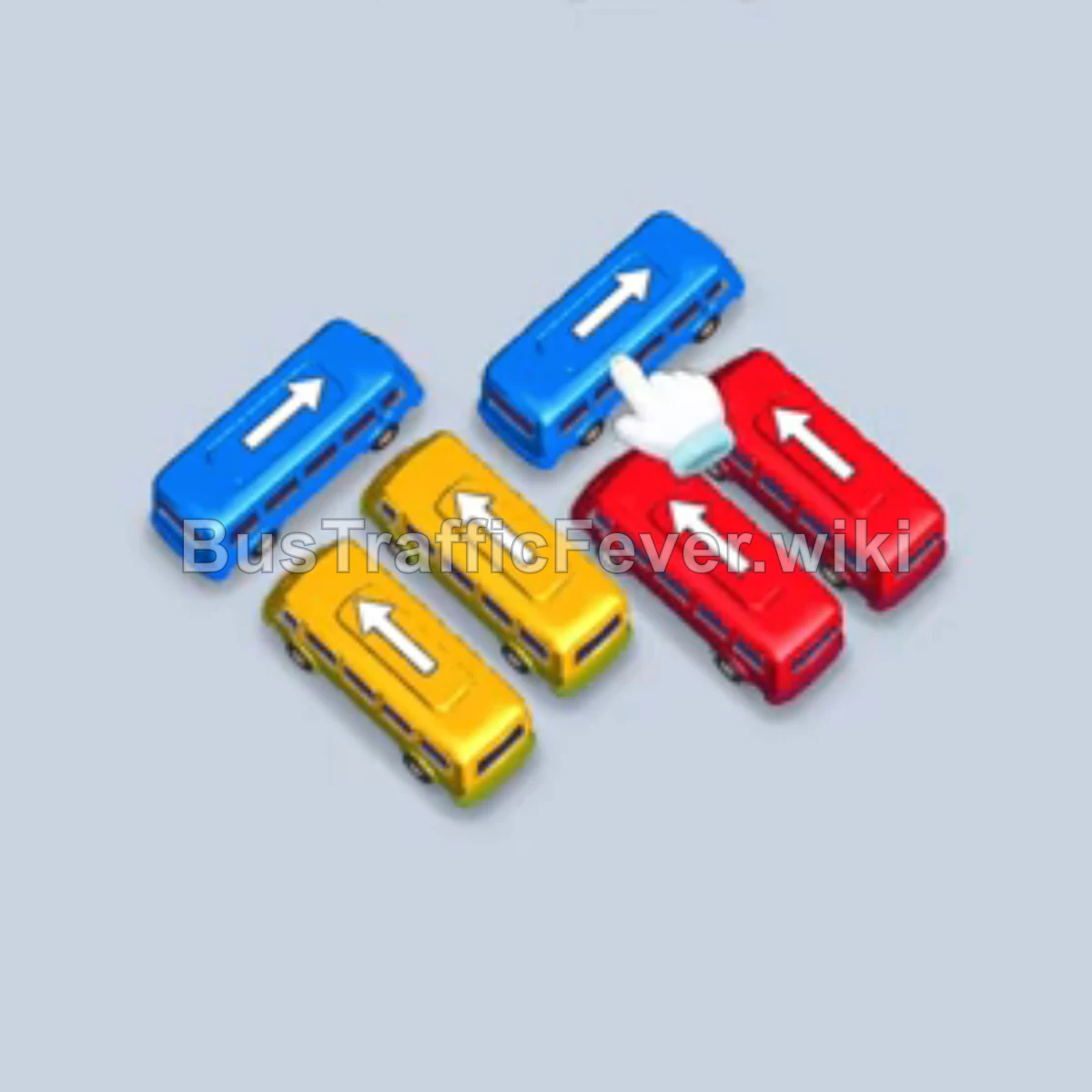
The Level 1 solution introduces matching passenger colors in a short sequence:
- Send the bottom-left Blue bus, then the Blue bus in the middle-left position. Let the blue passengers board and both buses leave.
- Send the bottom-middle Yellow bus and the Yellow bus behind it.
- Send the bottom-right Red bus and the Red bus behind it, then finish with the remaining Yellow bus.
Compare the screenshot with your own starting board before following this order. The lesson is to identify both the color and the position of each bus, rather than tap any bus of that color.
Why do some buses need to wait?
A bus can be useful even before its passengers arrive. Moving it may open a path to the bus you actually need next.
In Level 3, the opening clears Yellow and Blue buses, then moves the central Yellow bus into an empty slot to reach the Red buses behind it. The waiting move is part of the route to the next color.
Before parking a bus, ask:
- What path does this move open?
- Which passengers will eventually fill this bus?
- Is there room for the next bus needed to advance that queue?
Keeping a spare bay is a useful habit, but a fixed rule such as “never use more than half the bays” can conflict with a specific solution. Follow the guide’s boarding and departure conditions. For a later example, Level 370 parks a Red bus at the start and clears several other colors before red passengers reach it.
How do you read a walkthrough correctly?
Read a step as position + direction + action + condition. “Tap the Yellow bus” is incomplete when several Yellow buses are visible; “tap the left-edge Yellow bus pointing down” identifies the intended one.
A line that says “once the previous bus departs” is also an instruction. Do not send the next bus just because you have finished reading the previous line. In Level 303, the opening explicitly waits for blue and yellow passengers to clear before the next Yellow bus, and later waits for Cyan and Orange buses to leave.
Use the video on the level page to compare a confusing position or boarding transition. Pause at the corresponding board state and continue only when your buses and waiting bays match.
What changes on later boards?
The same basic rules remain useful, but later walkthroughs give you more to track:
- Longer waits: Level 356 keeps Blue buses parked while Pink, Orange, and Green buses serve other waves. A parked bus is not automatically a failed move.
- Repeated bay use: Level 370 sends Brown into a bay after Yellow departs and another Cyan into the bay vacated by the first Cyan bus.
- Newly exposed buses: Level 332 describes revealing mystery buses while clearing the center rows. Recheck the visible colors and paths after a reveal.
- Larger buses: Level 95 includes large Orange and Brown buses within specific color sequences. Bus size alone does not determine when to dispatch it.
You do not need to memorize all of these patterns before playing. Learn one from a matching walkthrough, then use the advanced parking and queue tips when you encounter it again.
What do the difficulty labels mean?
This wiki uses Easy, Medium, Hard, and Super Hard. Levels 1–4 use Easy, and later levels default to Medium unless the supplied walkthrough source explicitly labels them Hard or Super Hard. These labels are not a measured ranking of every board’s difficulty.
The Hard and Super Hard guide collects the labeled boards and highlights useful examples. For the current published coverage, use the level directory; its range updates as walkthroughs are added.
What should you check if you get stuck?
If a bus will not move, check its arrow path. If buses are waiting without loading, check the leading passenger color and whether you dispatched the correct bus. If the guide no longer matches, locate the first move or departure condition that differed.
For a symptom-by-symptom check, use why buses are not moving. If the unknown colors are the confusing part, read how to approach mystery buses.
When the starting layouts differ, do not force the same tap order onto your board. Compare the screenshot and video, check the game version, and identify the matching layout before continuing.
Return to the Bus Traffic Fever guide to choose a topic, or enter your level number in the search box to find the corresponding solution.
Related Levels
guides
Bus Traffic Fever Stuck? Why Buses Are Not Moving
Stuck in Bus Traffic Fever? Check blocked bus paths, waiting passengers, occupied parking slots, and mismatched boards before changing your next move.
guides
Bus Traffic Fever Mystery Buses: Question-Mark Board Guide
Learn how to read question-mark buses in Bus Traffic Fever, separate hidden colors from blocked paths, and recheck your plan after buses are revealed.
guides
Bus Traffic Fever Hardest Levels: Hard & Super Hard Guide
Find Hard and Super Hard Bus Traffic Fever walkthroughs, including levels above 300, with opening moves and examples of parking and queue challenges.