
Bus Traffic Fever Tips and Tricks: Bus Order & Parking Strategy
Check the leading passenger color, find a matching bus with a clear path, and count your free parking slots before tapping. Stage a later color only when you know how it will board. If the walkthrough requires a bus to depart first, wait for that slot before continuing.
Which Bus Traffic Fever tips should you use first?
Read the passenger queue, bus paths, and waiting bays together. A bus can be free to move without being useful to dispatch yet. Equally, a bus that will wait for passengers can be a necessary part of the solution. The decision depends on what it unlocks and how the occupied bay will become available again.
New to the controls? Start with how to play Bus Traffic Fever. For an exact tap order, choose your number in the Bus Traffic Fever walkthrough directory. The tips below explain decisions illustrated by those written guides; compare their board screenshots and videos with your own layout before applying a sequence.
How do you choose the next bus?
Before each dispatch, check three things:
- Passenger color: which color is at the front, and which colors follow it?
- Bus access: can the matching bus move along its indicated direction, or is another bus blocking it?
- Bay space: can you dispatch it without using a slot needed for the next required move?
If a matching bus is accessible, follow the level solution to load those passengers. If it is blocked, identify the blocking bus and check where that bus will wait before moving it. Do not assume every bus around the edge should leave first.
For example, the Level 13 opening starts with the upper-left Dark Blue bus pointing up-left, then the top-left Yellow bus, then the top-right Green bus. Positions and directions matter: a different bus of the same color is not an interchangeable move.
When should you stage a bus in a parking slot?
Waiting is useful when it has a purpose. You may need to park a bus before its passenger color reaches the front, either to prepare for that wave or to free access on the board. Before doing so, identify which passengers will fill it and whether another bus must enter first.
The Level 65 walkthrough illustrates this distinction. Its opening sends two Green buses to collect green passengers, then moves the long Blue bus from the top horizontal row into a waiting slot. The Purple bus follows before blue and purple passengers begin boarding. A rule such as “only dispatch a bus that empties immediately” would prevent following that solution.
Use a free bay as a planning buffer where possible, but do not turn that into an absolute rule that overrides a board-specific walkthrough. What matters is whether the parked buses can board and release space for the remaining sequence.
When should you wait before tapping again?
Wait whenever the next step depends on a bus filling and departing. Reading a list of colors too quickly can hide this condition: the next bus may need the same bay that is still occupied.
In the Level 248 opening, the written guide places two Pink buses and notes that the second fills and leaves. Later, a Cyan bus uses the opened slot. It also describes both Yellow buses departing before the next part of the Cyan sequence. These departures are part of the solution, not optional pauses.
If your bays are filling unexpectedly, compare the current passengers and parked buses with the corresponding step. Avoid adding another color until you understand which parked bus is supposed to leave next.
How should you handle large buses?
Match a large bus to its upcoming passenger wave and allow for the time it occupies a bay. Its size alone does not make it the best next move.
The Level 95 solution stages Pink, Blue, and a large Orange bus in its opening sequence, followed by Cyan and Purple. Later, a large Brown bus takes the brown passenger line. Follow the color order and boarding conditions rather than sending every large bus out first.
When a large bus remains parked, check whether more passengers of its color are still behind another wave. You may need to clear that earlier wave before it can finish boarding.
What should you do when new buses are revealed?
Recheck the available paths and passenger colors when the board changes. A plan based on visible buses may need another look after a hidden bus is exposed or an additional bus appears.
The Level 17 guide includes a Pink bus emerging near the upper-middle right after the initial clearing steps. Use its location in the guide to identify it, then check the next move instead of assuming the opening screenshot contains every bus you will need.
How do you manage a bus that waits through several waves?
Track why the bus is waiting, not just how long it has occupied a bay. A planned wait leaves other bays available for the colors ahead of it. An accidental wait can consume the space needed to bring those colors out.
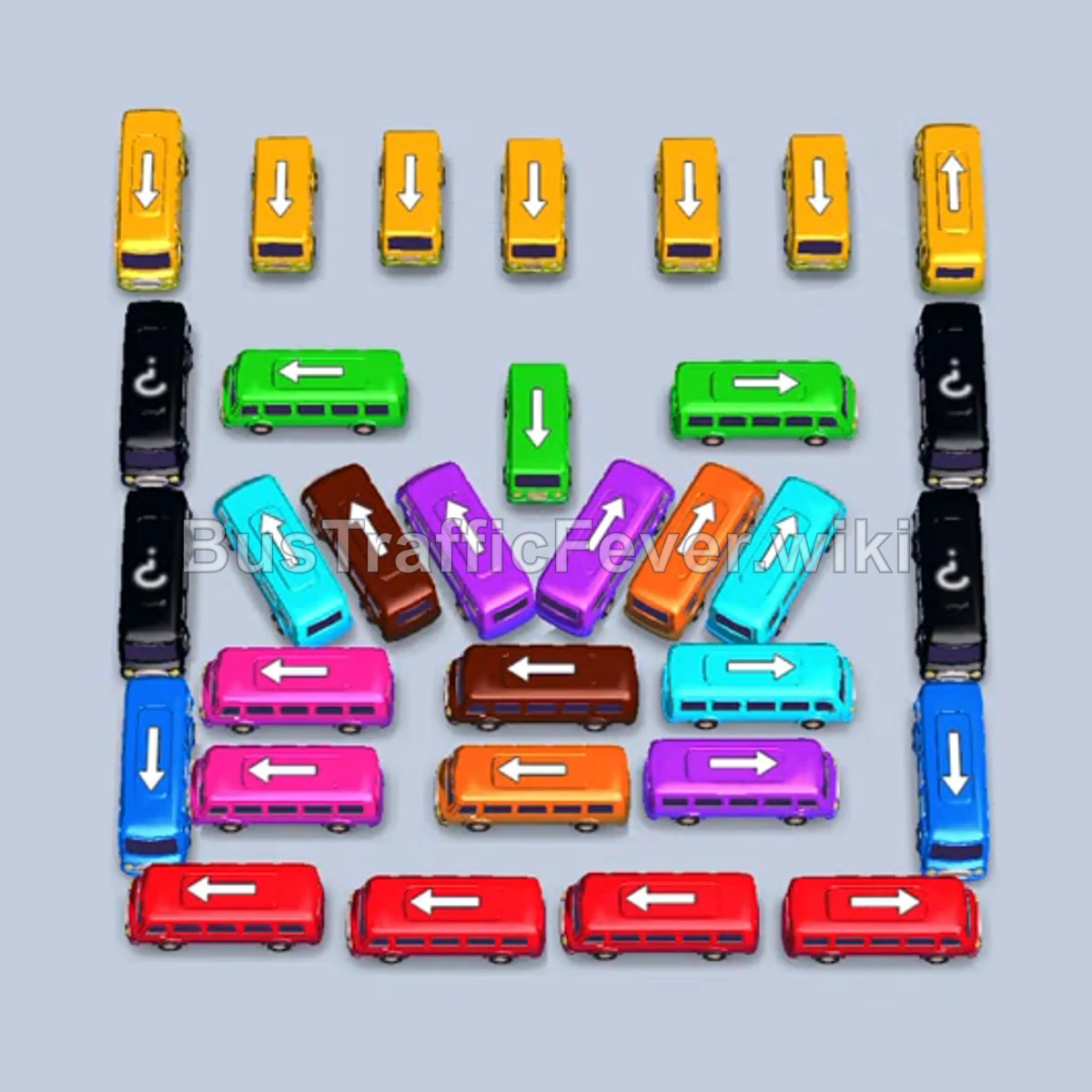
The Level 356 walkthrough gives a useful practice sequence:
- Complete the Red-bus opening in the linked guide and wait for the departures it specifies.
- Send the bottom-left Blue, middle-left Pink, bottom-right Blue, and middle Pink buses in the guide’s order.
- Let the Pink buses fill and leave while the Blue buses wait.
- Use the newly available space for Orange and Green. Their passengers board before blue passengers reach the waiting Blue bus.
This shows why “parked” and “stuck” are different states. Before abandoning an attempt, check whether the waiting bus is still consistent with the written sequence. Do not add more buses of its color merely because it has not filled yet.
How can you track repeated use of the same parking bay?
Think of each bay as a sequence of occupants. Before sending a replacement, confirm that the previous bus has actually left.
In the Level 370 opening, Red waits in bay 1 while Cyan and Yellow start the active sequence. The upper-middle Brown bus enters bay 3 after Yellow departs. The bottom-left Cyan bus takes bay 2 after the first Cyan departs. The early Red bus does not leave until the later red wave, after the Magenta sequence.
Use these departures as checkpoints. If your Brown bus has nowhere to go, revisit the Yellow boarding condition. If bay 2 is still occupied, wait for the first Cyan bus instead of filling another bay to get ahead of the list. Bay numbers describe this walkthrough’s sequence; compare your own layout before relying on them.
How do you combine temporary parking with newly revealed buses?
On Level 332, the opening parks Orange and Magenta to open the left flank. Purple and Cyan then board, the waiting Magenta clears, a long Cyan bus handles the next wave, and Orange finally boards when its passengers arrive.
The later central-grid phase reveals mystery buses. Separate what you know from what is still hidden: follow the confirmed opening, then inspect each newly exposed bus before continuing. Do not reserve your remaining space for a color you have only guessed.
For more boards to practice these decisions, use the Hard and Super Hard level guide. Higher numbers alone do not identify difficulty: the Medium-labeled Level 370 still provides a useful example of long waits and bay reuse.
For a closer look at question-mark layouts and reveal checkpoints, read the mystery-bus guide.
How do you troubleshoot a failed attempt?
- A bus will not move: compare its position and direction with the step, then check its path for another bus.
- Several buses are waiting: identify the leading passenger color and the bus that should collect it. Check whether you missed a departure condition.
- The sequence stopped matching: find the first step where your board differed, rather than changing several later moves at once.
- The starting board is different: compare the screenshot and video before trying the same order. Do not assume a matching level number guarantees a matching layout.
Use the buses-not-moving checklist to distinguish a blocked path, a planned wait, and a missing free bay. Once you know where the attempt diverged, retry using the corresponding guide. The goal is to understand the missing condition, not to memorize a longer list of colors.
Where can you find the next walkthrough?
Browse the Bus Traffic Fever level walkthroughs for a specific answer, revisit the beginner guide for the core rules, or return to the Bus Traffic Fever guide to choose your next topic.
Related Levels
guides
Bus Traffic Fever Stuck? Why Buses Are Not Moving
Stuck in Bus Traffic Fever? Check blocked bus paths, waiting passengers, occupied parking slots, and mismatched boards before changing your next move.
guides
Bus Traffic Fever Mystery Buses: Question-Mark Board Guide
Learn how to read question-mark buses in Bus Traffic Fever, separate hidden colors from blocked paths, and recheck your plan after buses are revealed.
guides
Bus Traffic Fever Hardest Levels: Hard & Super Hard Guide
Find Hard and Super Hard Bus Traffic Fever walkthroughs, including levels above 300, with opening moves and examples of parking and queue challenges.