Bus Traffic Fever Level 14 Answer & Walkthrough Solution


Quick answer
Use the embedded walkthrough for the exact order. Clear the vehicles blocking an exit first, then stage the next matching color without filling every parking slot.
Step-by-step solution
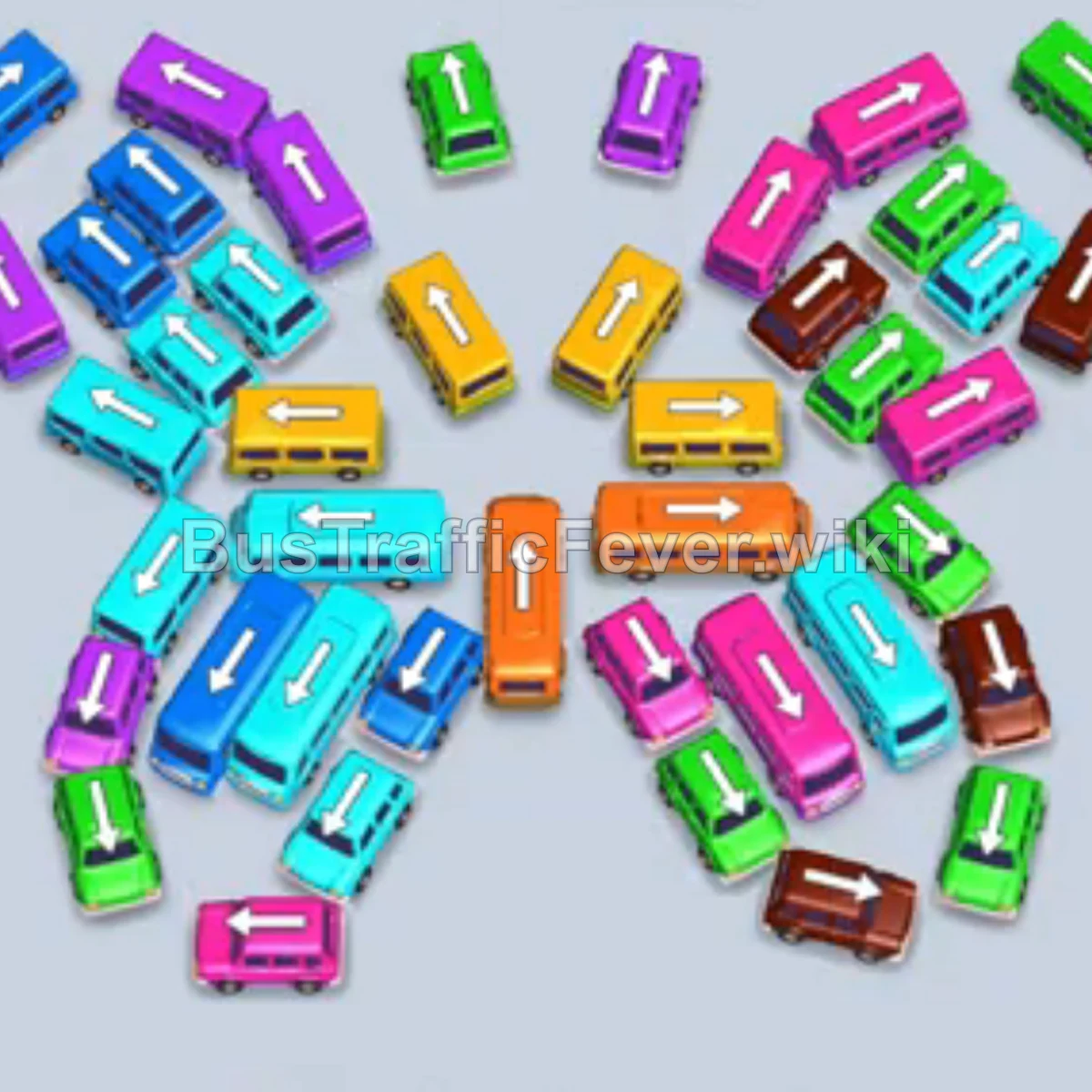
Phase 1: Clearing Outer Perimeter & Wings
- Tap the Light Green bus at the bottom right pointing down. Light green passengers board and depart.
- Tap the Dark Blue bus on the upper-left wing pointing up. Blue passengers board.
- Tap the Purple bus on the far-left edge pointing up. Purple passengers board.
- Tap the Brown bus at the bottom-right corner pointing right. Brown passengers board.
- Tap the Light Green bus on the upper-left wing pointing up. Green passengers board.
- Tap the Orange bus on the far-right edge pointing up. Orange passengers board.
Phase 2: Opening the Central Butterfly Body
- Tap the Cyan (Light Blue) bus in the center pointing left. Cyan passengers board.
- Tap the Orange bus in the center pointing right. Orange passengers board and clear out.
- Tap the Green bus in the center pointing left. Green passengers board.
- Tap the Brown bus on the far-right edge pointing right. Brown passengers board.
- Tap the Pink bus on the bottom-right pointing right.
- Tap the Pink bus on the far-right pointing right. Pink passengers board and depart.
Phase 3: Untangling the Lower Left Wing
- Tap the Blue bus on the upper-left wing pointing up. Blue passengers board.
- Tap the Yellow bus in the center pointing right to board yellow passengers.
- Tap the Pink bus on the bottom-left wing pointing down.
- Tap the Pink bus on the bottom-left wing pointing left. Pink passengers board.
- Tap the Blue bus on the far-left pointing down. Blue passengers board.
- Tap the Cyan bus on the bottom-left pointing down.
- Tap the Green bus at the bottom-left pointing down. Green passengers board.
- Tap the Cyan bus on the far-left pointing up. Cyan passengers board.
Phase 4: Mid-Stage Maneuvers & Unblocking Paths
- Tap the Brown bus on the bottom-left pointing down. Brown passengers board.
- Tap the Pink bus on the bottom-left pointing left.
- Tap the Pink bus in the lower-middle pointing right to clear the pink wave.
- Tap the Blue bus on the left pointing down. Blue passengers board.
- Tap the Cyan bus on the lower-left pointing down.
- Tap the Green bus on the lower-left pointing up. Green passengers board.
- Tap the Cyan bus on the lower-left pointing down. Cyan passengers board and depart.
- Tap the Green bus in the upper-center area pointing up. Green passengers board.
Phase 5: Clearing the Remaining Wings & Final Rush
- Tap the Purple bus on the upper-left wing pointing up.
- Tap the Yellow bus on the upper-right wing pointing right. Yellow passengers board.
- Tap the Green bus on the upper-right wing pointing up. Green passengers board.
- Tap the Orange bus on the far-left pointing right. Orange passengers board.
- Tap the Purple bus on the upper-left wing pointing up. Purple passengers board.
- Tap the Pink bus in the lower-middle pointing down. Pink passengers board.
- Tap the Blue bus on the upper-left wing pointing down. Blue passengers board.
- Tap the Cyan bus on the far-left pointing down.
- Tap the Cyan bus in the middle-left pointing left. Cyan passengers board.
- Tap the Yellow bus in the middle-left pointing right. Yellow passengers board.
- Tap the Green bus on the upper-left pointing up. Green passengers board.
- Tap the Brown bus on the upper-right wing pointing up. Brown passengers board.
- Tap the Cyan bus on the far-left pointing down. Cyan passengers board.
- Finally, tap the Yellow bus on the upper-left pointing right to collect the last yellow passengers and achieve a Perfect! rating.
Tips for success
- Symmetrical Butterfly Layout: Vehicles are packed in angled wing formations. Tapping the outermost angled vehicles first gradually unlocks the tightly packed central spine.
- Match High-Capacity Buses Early: Buses hold significantly more passengers than buses. Make sure buses of the active queue color enter the bays promptly to drain long queues quickly.
- Preserve Parking Bay Slots: Only move blocking vehicles to the top bays when you have a clear path to free an active color immediately afterwards.
More Bus Traffic Fever help
Continue with the Level 13 walkthrough or Level 15 walkthrough, review how to play Bus Traffic Fever, or browse all level solutions.