Bus Traffic Fever Level 200 Answer & Walkthrough Solution

Quick answer
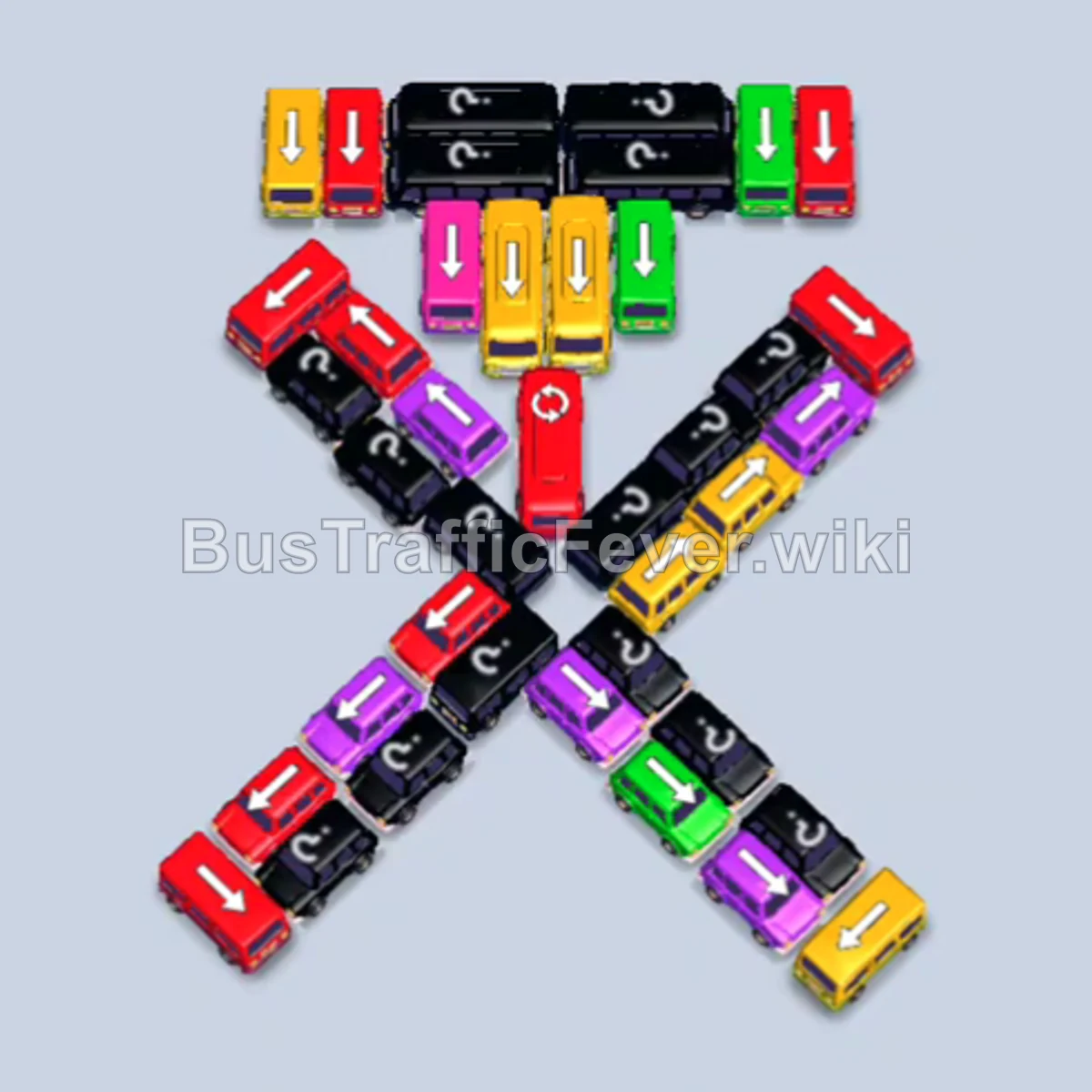
Level 200 features an X-shaped grid intersected by a central column, with only 4 open parking slots. The key strategy is to completely dismantle the lower-left diagonal arm first, followed by the lower-right arm. This clears ample exit space and uncovers hidden mystery vehicles before you tackle the congested central column and top rows. Always match incoming passenger colors to keep slots cycling quickly and avoid gridlock.
Step-by-step solution
Phase 1: Clearing the Bottom-Left Branch
- Tap the Red bus at the outer tip of the bottom-left arm (pointing down-left). It drives into a slot to board red passengers.
- Tap the second Red bus directly behind it on the bottom-left arm.
- Tap the two Magenta/Purple buses next in line along the bottom-left arm. Red passengers finish boarding and both red buses leave, followed immediately by purple passengers filling and clearing the purple buses.
- Tap the Green bus on the bottom-left arm (pointing down-left). It moves to a parking slot, collects green passengers, and departs.
- Tap the Red bus now exposed on the bottom-left arm (pointing down-left) to board the incoming red passengers and depart.
- Tap the Yellow bus and the Yellow bus at the top of the bottom-left arm (both pointing down-left). Yellow passengers board both vehicles sequentially, clearing the entire bottom-left arm.
Phase 2: Clearing the Bottom-Right Branch
- Tap the Red bus on the bottom-right arm (pointing down-right). It enters a slot, picks up red passengers, and leaves.
- Tap the Yellow bus exposed on the bottom branch to hold in a slot, followed by the Red bus and Magenta bus behind it. The red and magenta passengers board and depart.
- Tap the Green bus on the bottom-right arm (pointing down-right) to collect green passengers and clear its slot.
- Tap the Pink bus on the bottom-right arm (pointing down-right). Pink passengers board and it departs.
- Tap the small Green bus next in line (pointing down-right) to finish the green passenger segment.
- Tap the Yellow bus on the bottom-right arm. It combines with the waiting yellow bus in the slots to load the incoming yellow passenger wave.
- Tap the Purple bus on the bottom-right arm into a parking slot to board purple passengers.
- Tap the Pink bus directly behind it (pointing down-right) to absorb the next pink passenger group and depart.
- Tap the Red bus at the inner base of the right arm (pointing down-right). It boards red passengers and departs, completely clearing the bottom-right arm.
Phase 3: Untangling the Center & Upper Branches
- Tap the two Yellow buses in the center cluster, followed by the Purple bus (center-left) and the Green bus (center-bottom). Purple and green passengers clear their respective vehicles first, freeing up slots for the yellow passengers to finish boarding.
- Tap the Purple bus on the upper-right branch (pointing down-left). It boards purple passengers and departs.
- Tap the Yellow bus and the Green bus on the upper-right branch (pointing down-right). Purple and yellow passengers finish boarding and both depart.
- Tap the Red bus on the upper-left branch (pointing down-left) to clear red passengers.
- Tap the Blue bus in the center (pointing down-left). Blue passengers immediately board and it departs.
- Tap the Yellow bus on the upper-right branch into a slot to board yellow passengers and leave while green passengers finish boarding the green vehicle.
Phase 4: Clearing the Core and Final Vehicles
- Tap the Blue bus (pointing down-left), the Red bus (pointing down-left), and the Red bus in the center column (pointing down). Blue and red passengers board and all three vehicles depart.
- Tap the central Purple bus (pointing down-left) and the Yellow bus at the bottom-center (pointing down). Purple and yellow passengers board and depart.
- Tap the Green bus (pointing down) and the Yellow bus directly behind it. Green and yellow passengers fill both vehicles and they exit.
- Tap the Red bus on the left (pointing down) to clear red passengers, followed by the Pink bus (pointing down-right) to clear pink passengers.
- Tap the Yellow bus in the upper row (pointing down). It enters a slot and boards yellow passengers.
- Tap the remaining Green bus (pointing left) and Blue bus (pointing left). The green bus boards and leaves first, followed by the blue bus and the final yellow bus to achieve a Perfect completion on Level 200.
Tips for success
- Clear One Branch Completely: Focus on emptying the bottom-left arm entirely before opening the right side. This guarantees clear lanes for vehicles to exit without bumping into each other.
- Respect the 4-Slot Limit: With three slots locked, parking more than two non-matching vehicles will cause immediate gridlock. Only send a vehicle out if its color is currently active or next in the crowd queue.
- Dismiss Popups Quickly: When tapping near the bottom or center, tap cleanly on the vehicles to avoid accidentally triggering the container/booster store windows.
More Bus Traffic Fever help
Continue with the Level 199 walkthrough, review the core rules in how to play Bus Traffic Fever, or browse all level solutions to jump to another number.