Bus Traffic Fever Level 12 Answer & Walkthrough Solution

Quick answer
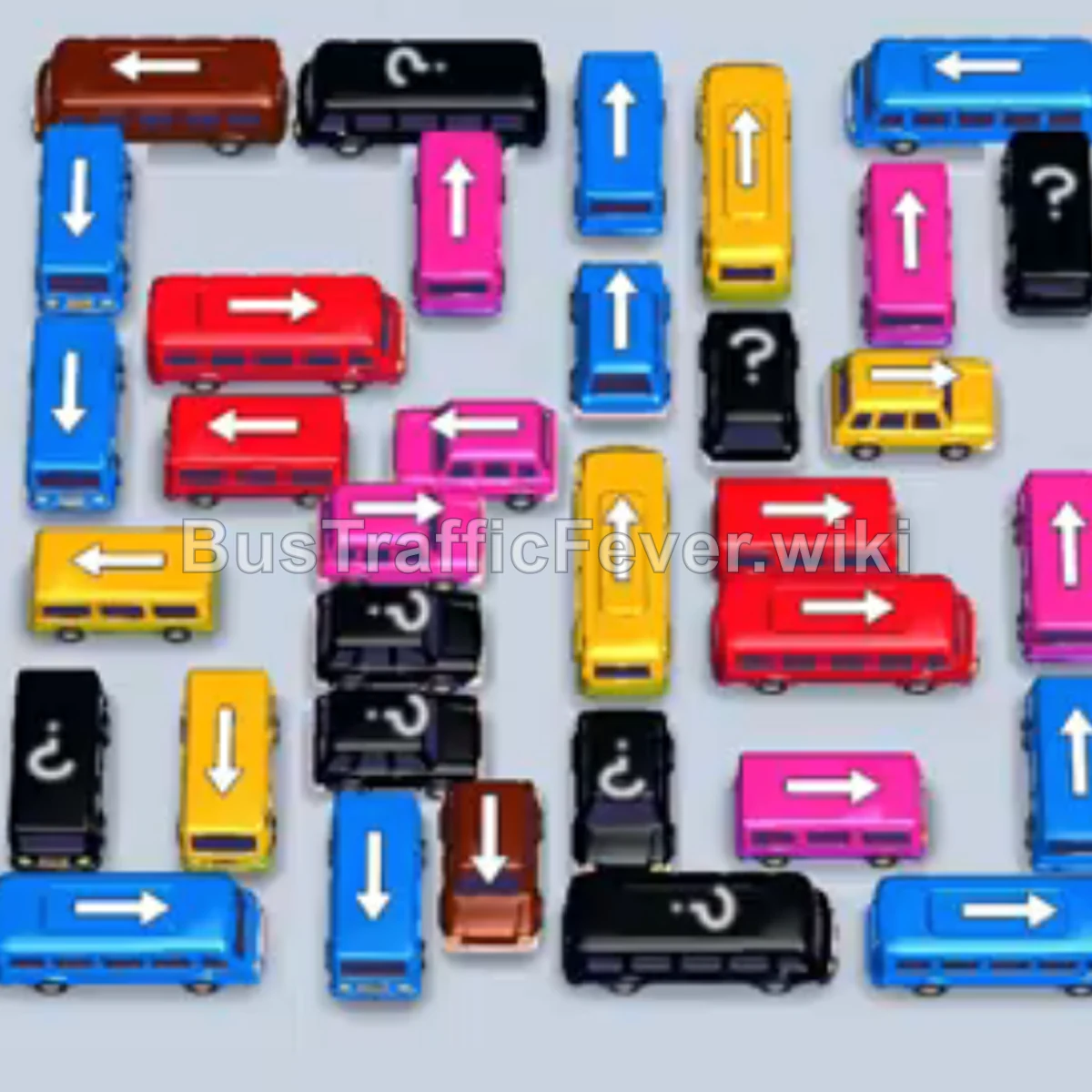
Use the embedded walkthrough for the exact order. Clear the vehicles blocking an exit first, then stage the next matching color without filling every parking slot.
Step-by-step solution
Phase 1: Clearing the Perimeter & Initial Queue
- Tap the Cyan bus at the top right pointing left. Cyan passengers will begin boarding.
- Tap the Brown bus at the top left pointing right. Brown passengers board and clear out.
- Tap the Yellow bus at the top left pointing right to pick up the incoming yellow passenger wave.
- Tap the Pink bus in the upper-center area pointing right. Pink passengers board and depart.
- Tap the Cyan bus at the top-middle pointing upwards to collect the next cyan group.
Phase 2: Unlocking the Upper Grid & Mystery Blocks
- Tap the Yellow bus at the top right pointing up. Yellow passengers begin boarding.
- Tap the Cyan bus on the upper-left pointing down into an open parking bay.
- Tap the Pink bus at the top right (revealed from the mystery block).
- Tap the Dark Blue bus on the upper-right side pointing up.
- Tap the Pink bus in the middle row pointing right to collect the pink passengers.
- Tap the Red bus in the upper-middle area pointing left. Red passengers board and clear.
Phase 3: Navigating the Mid-Level Traffic
- Tap the Pink bus on the right side pointing upwards to pick up the pink queue.
- Tap the Yellow bus in the center-right column pointing downwards. Yellow passengers board.
- Tap the Dark Blue bus on the left side pointing downwards.
- Tap the Pink bus in the middle pointing left to clear out pink passengers.
- Tap the Yellow bus on the right side pointing right.
- Tap the Red bus on the middle-right pointing right. Red passengers board and depart.
Phase 4: Clearing the Lower Section & Queue Loops
- Tap the Yellow bus at the bottom right pointing right to board the incoming yellow crowd.
- Tap the Cyan bus at the bottom left pointing right.
- Tap the Brown bus at the bottom-middle pointing up. Brown passengers board and exit.
- Tap the Cyan bus on the lower-left pointing down to board cyan passengers.
- Tap the Pink bus on the lower-left pointing down.
- Tap the Yellow bus on the lower-left pointing down.
- Tap the Red bus on the right side pointing right. Red passengers board.
Phase 5: Final Rush & Stage Completion
- Tap the Dark Blue bus in the lower-middle pointing up. Dark blue passengers board.
- Tap the Red bus in the center pointing right.
- Tap the Dark Blue bus on the far-left side pointing down into an available bay.
- Tap the Dark Blue bus on the far-left side pointing up. Dark blue passengers board and clear.
- Tap the Yellow bus on the lower-right pointing up to board yellow passengers.
- Tap the Pink bus on the bottom right pointing right.
- Tap the Pink bus in the center pointing right to finish off the pink passengers.
- Tap the Red bus in the center pointing right to clear the remaining red passengers.
- Finally, tap the Yellow bus on the left pointing down to collect the last yellow passengers and achieve a Perfect! rating.
Tips for success
- Track the Snaking Queue: Passengers flow along an S-shaped track. Always check which color cluster is arriving next before sending a vehicle into the parking bays.
- Prioritize Outer Blockers: Buses on the outer perimeter typically hold smaller buses trapped inside. Clear perimeter buses first to create room for interior vehicles.
- Keep Bay Space Open: Avoid sending multiple non-matching vehicles to the top bays at once to prevent running out of holding slots.
More Bus Traffic Fever help
Continue with the Level 11 walkthrough or Level 13 walkthrough, review how to play Bus Traffic Fever, or browse all level solutions.