Bus Traffic Fever Level 301 Answer & Walkthrough Solution

Quick answer
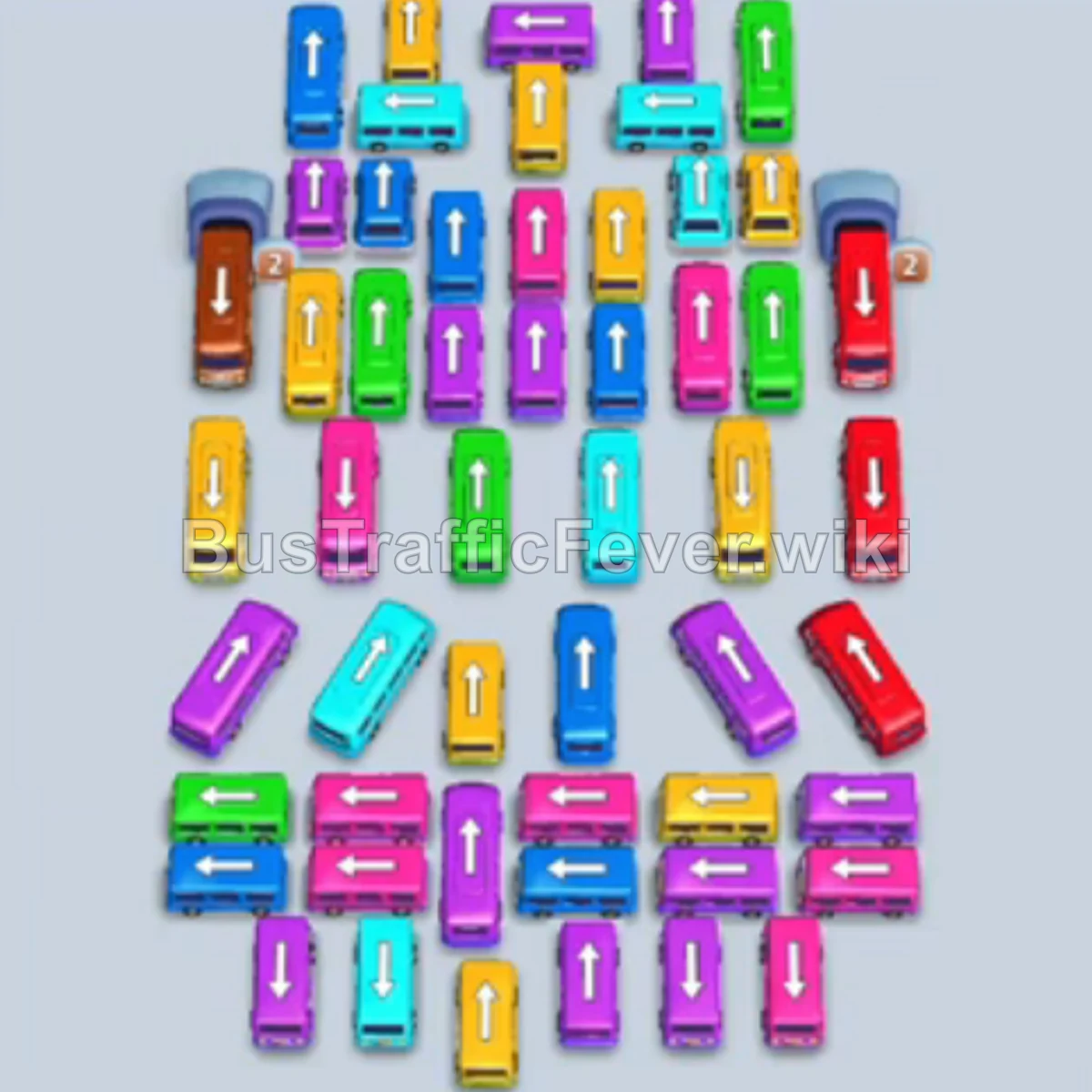
Level 301 is an endurance puzzle featuring a deeply stacked layout of interlocked buses and a conveyor with continuous, dense waves of passengers. The winning strategy requires releasing buses in complete color sets that mirror the passenger queue (moving through silver, yellow, cyan, pink, green, and finally brown). By synchronizing bus departures with matching color groups, all four parking bays remain fluid, preventing traffic jams and ensuring free slots are immediately available for the next color wave.
Step-by-step solution
Phase 1: Clearing the Silver Fleet
- Tap the vertical silver bus on the upper-left edge to park it in slot 1 (holds 40 passengers).
- Tap the vertical silver bus in the upper-center column to park it in slot 2 (holds 28 passengers).
- Tap the vertical silver bus in the upper-right section to park it in slot 3 (holds 24 passengers).
- Tap the horizontal silver bus in the upper-middle right into slot 4 (holds 24 passengers). The silver passenger wave boards completely, clearing all four slots.
Phase 2: Yellow and Cyan Openings
- Tap the horizontal yellow bus at the top center to move it into slot 1.
- Tap the vertical cyan bus in the center column into slot 2 to absorb the initial cyan crowd.
- Tap the vertical yellow bus on the upper left into slot 3.
- Tap the vertical cyan bus on the upper right into slot 4. The yellow and cyan buses finish loading and depart.
Phase 3: Pink and Cyan Waves
- Tap the horizontal pink bus on the upper right into slot 1.
- Tap the vertical pink bus in the upper center into slot 2.
- Tap the horizontal pink bus in the middle row into slot 3.
- Tap the vertical pink bus on the middle-left into slot 4. The pink passengers fill and clear all four bays.
- Tap the horizontal cyan bus in the middle center into slot 1.
- Tap the vertical cyan bus in the center-left column into slot 2.
- Tap the long horizontal cyan bus across the lower-middle into slot 3 (capacity 40).
Phase 4: Green and Yellow Waves
- Tap the horizontal green bus in the center into the freed slot 1.
- Tap the horizontal green bus in the lower right into slot 2.
- Tap the horizontal green bus near the bottom right into slot 4. The cyan and green buses depart.
- Tap the vertical yellow bus along the left side into slot 1.
- Tap the horizontal yellow bus in the middle-left into slot 2.
- Tap the horizontal yellow bus in the lower-middle area into slot 3. Yellow passengers board and depart.
Phase 5: Pink, Cyan, and Green Rotations
- Tap the vertical pink bus on the center-right into slot 1.
- Tap the horizontal pink bus on the lower left into slot 2.
- Tap the horizontal pink bus in the lower right into slot 3.
- Tap the vertical cyan bus in the center column into slot 1.
- Tap the horizontal cyan bus in the center into slot 2.
- Tap the horizontal cyan bus along the bottom into slot 3.
- Tap the horizontal green bus on the middle-left into slot 1.
- Tap the large vertical green bus on the upper-left (capacity 40) into slot 2.
- Tap the horizontal green bus in the lower center into slot 3.
Phase 6: Mid-Stage Color Cycles
- Tap the vertical cyan bus on the far left into slot 1.
- Tap the horizontal cyan bus in the middle into slot 3.
- Tap the vertical yellow bus in the center column into slot 2.
- Tap the horizontal yellow bus in the middle right into slot 1.
- Tap the vertical cyan bus in the center into slot 2.
- Tap the horizontal cyan bus on the lower left into slot 3.
- Tap the vertical green bus on the center-right into slot 1.
- Tap the horizontal green bus near the bottom into slot 2.
- Tap the vertical pink bus in the center into slot 3.
- Tap the horizontal pink bus on the lower right into slot 1.
- Tap the vertical yellow bus on the left into slot 2.
- Tap the horizontal yellow bus at the bottom into slot 3.
- Tap the horizontal green bus in the lower center into slot 1.
- Tap the large vertical green bus on the upper-left (capacity 40) into slot 2.
- Tap the vertical pink bus in the center into slot 3.
- Tap the horizontal pink bus on the right into slot 4.
Phase 7: Unraveling the Dense Grid
- Tap the vertical cyan bus in the center into slot 1.
- Tap the horizontal cyan bus on the lower right into slot 2.
- Tap the vertical yellow bus in the center into slot 3.
- Tap the horizontal yellow bus on the lower right into slot 4.
- Tap the vertical green bus on the left into slot 1.
- Tap the horizontal green bus on the lower right into slot 2.
- Tap the vertical pink bus in the center into slot 3.
- Tap the horizontal pink bus on the lower right into slot 4.
- Tap the horizontal cyan bus at the bottom into slot 1.
- Tap the vertical cyan bus on the left (capacity 40) into slot 2.
- Tap the vertical yellow bus in the center into slot 3.
- Tap the horizontal yellow bus at the bottom into slot 4.
- Tap the horizontal pink bus in the center into slot 1.
- Tap the vertical pink bus on the left (capacity 40) into slot 2.
- Tap the vertical green bus in the center into slot 3.
- Tap the horizontal green bus at the bottom into slot 4.
- Tap the horizontal cyan bus in the middle into slot 1.
- Tap the vertical cyan bus in the center into slot 2.
- Tap the vertical yellow bus on the left into slot 3.
- Tap the horizontal yellow bus at the bottom into slot 4.
Phase 8: High-Volume Color Matching
- Tap the vertical pink bus in the center into slot 1.
- Tap the horizontal pink bus at the bottom into slot 2.
- Tap the horizontal cyan bus in the lower center into slot 3.
- Tap the vertical cyan bus in the center into slot 4.
- Tap the horizontal pink bus at the bottom into slot 1.
- Tap the large vertical pink bus in the center (capacity 40) into slot 2.
- Tap the vertical yellow bus on the left into slot 3.
- Tap the horizontal yellow bus at the bottom into slot 4.
- Tap the vertical cyan bus in the center into slot 1.
- Tap the horizontal cyan bus at the bottom into slot 2.
- Tap the vertical yellow bus in the center into slot 3.
- Tap the horizontal yellow bus on the right into slot 4.
- Tap the vertical pink bus in the center into slot 1.
- Tap the horizontal pink bus on the right into slot 2.
- Tap the vertical yellow bus in the center into slot 3.
- Tap the horizontal yellow bus at the bottom into slot 4.
- Tap the vertical cyan bus in the center into slot 1.
- Tap the horizontal cyan bus at the bottom into slot 2.
- Tap the vertical pink bus in the center into slot 3.
- Tap the horizontal pink bus at the bottom into slot 4.
Phase 9: Narrowing Down the Board
- Tap the vertical cyan bus in the center into slot 1.
- Tap the horizontal cyan bus at the bottom into slot 2.
- Tap the vertical yellow bus in the center into slot 3.
- Tap the horizontal yellow bus at the bottom into slot 4.
- Tap the vertical pink bus in the center into slot 1.
- Tap the horizontal pink bus at the bottom into slot 2.
- Tap the vertical cyan bus in the center into slot 3.
- Tap the horizontal cyan bus at the bottom into slot 4.
- Tap the vertical yellow bus in the center into slot 1.
- Tap the horizontal yellow bus at the bottom into slot 2.
- Tap the vertical pink bus in the center into slot 3.
- Tap the horizontal pink bus at the bottom into slot 4.
- Tap the vertical cyan bus in the center into slot 1.
- Tap the horizontal cyan bus at the bottom into slot 2.
- Tap the vertical yellow bus in the center into slot 3.
- Tap the horizontal yellow bus at the bottom into slot 4.
- Tap the vertical pink bus in the center into slot 1.
- Tap the horizontal pink bus at the bottom into slot 2.
- Tap the vertical cyan bus in the center into slot 3.
- Tap the horizontal cyan bus at the bottom into slot 4.
- Tap the vertical yellow bus in the center into slot 1.
- Tap the horizontal yellow bus at the bottom into slot 2.
- Tap the vertical pink bus in the center into slot 3.
- Tap the horizontal pink bus at the bottom into slot 4.
- Tap the vertical cyan bus in the center into slot 1.
- Tap the horizontal cyan bus at the bottom into slot 2.
- Tap the vertical yellow bus in the center into slot 3.
- Tap the horizontal yellow bus at the bottom into slot 4.
- Tap the vertical pink bus in the center into slot 1.
- Tap the horizontal pink bus at the bottom into slot 2.
Phase 10: Final Streaks and Brown Buses
- Tap the vertical cyan bus in the center into slot 3.
- Tap the horizontal cyan bus at the bottom into slot 4.
- Tap the vertical green bus in the center into slot 1.
- Tap the horizontal green bus at the bottom into slot 2.
- Tap the vertical pink bus in the center into slot 3.
- Tap the horizontal pink bus at the bottom into slot 4.
- Tap the vertical cyan bus in the center into slot 1.
- Tap the horizontal cyan bus at the bottom into slot 2.
- Tap the vertical yellow bus in the center into slot 3.
- Tap the horizontal yellow bus at the bottom into slot 4.
- Tap the vertical pink bus in the center into slot 1.
- Tap the horizontal pink bus at the bottom into slot 2.
- Tap the vertical green bus in the center into slot 3.
- Tap the horizontal green bus at the bottom into slot 4.
- Tap the vertical brown bus in the center into slot 1.
- Tap the horizontal brown bus at the bottom into slot 2.
- Tap the vertical brown bus in the center into slot 3.
- Tap the horizontal brown bus at the bottom into slot 4 to load the final brown passengers and complete the level.
Tips for success
- Anticipate Queue Transitions: Passenger colors switch predictably in repetitive segments. Check the approaching crowd in the curved queue before tapping a vehicle to ensure an exact color match.
- Preserve Parking Bay Capacity: Never park a vehicle whose color isn’t currently at the front of the queue; with only four bays available, a single blocked slot will quickly cause a dead end.
- Target Capacity 40 Buses Early: Larger 40-capacity vehicles take longer to clear the board; send them in as soon as their matching color crowd arrives to unlock the vehicles tucked behind them.
More Bus Traffic Fever help
Continue with the Level 300 walkthrough, review the core rules in how to play Bus Traffic Fever, or browse all level solutions to jump to another number.