Bus Traffic Fever Level 309 Answer & Walkthrough Solution
Quick answer
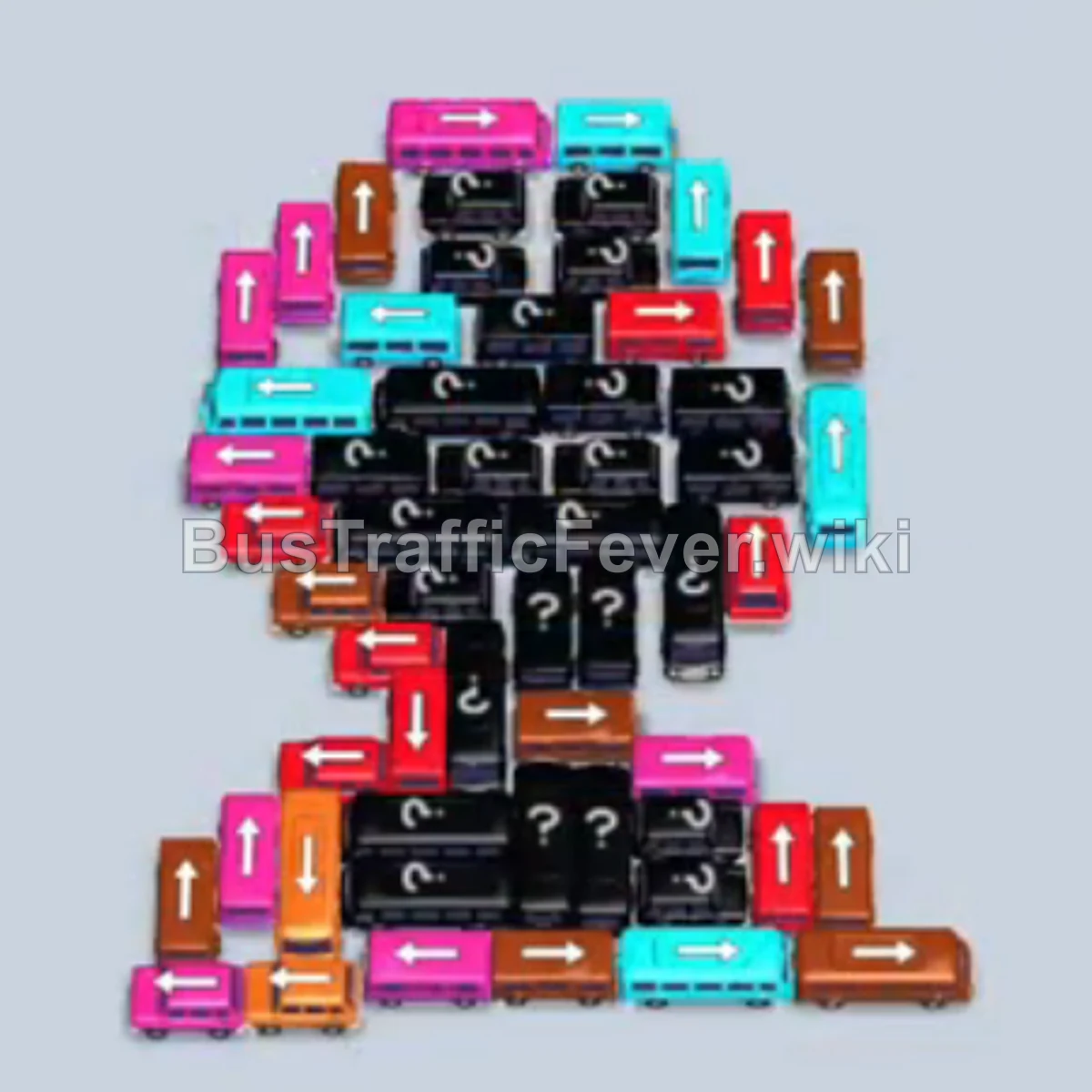
Level 309 features a large clustered block of parked buses and buses shaped like the numeral 2, along with hidden question-mark vehicles buried underneath. The key challenge is balancing parking slots while matching the passenger queue consisting of pink, green, orange, teal, and brown passengers. Unlocking outer vertical and horizontal vehicles systematically peels away layers to uncover hidden vehicles without overloading the waiting dock.
Step-by-step solution
Phase 1: Clearing Outer Vehicles & Initial Layers
- Tap the horizontal teal bus at the bottom right facing left to pick up initial teal passengers.
- Tap the horizontal pink bus near the bottom edge facing left.
- Tap the horizontal pink bus on the middle-left edge facing left to clear front-row pink passengers.
- Tap the horizontal green bus at the bottom edge facing left to take front green passengers.
- Tap the horizontal brown bus along the bottom base facing left.
- Tap the vertical pink bus facing down along the left side.
- Tap the vertical green bus facing up on the left side to collect advancing green passengers.
- Tap the vertical pink bus facing down along the left perimeter.
- Tap the horizontal orange bus facing right on the bottom row.
- Tap the vertical orange bus on the right side facing down.
- Tap the horizontal pink bus facing left near the bottom curve.
- Tap the vertical teal bus facing down on the far left.
- Tap the horizontal brown bus on the bottom row facing right.
- Tap the horizontal pink bus facing left to help clear the remaining pink queue.
- Tap the horizontal teal bus facing left near the bottom center.
- Tap the vertical green bus facing up on the left side.
- Tap the vertical pink bus facing up on the right side.
- Tap the vertical orange bus facing up on the left flank.
- Tap the horizontal teal bus facing left near the lower-middle section.
Phase 2: Opening the Center & Upper Loops
- Tap the vertical orange bus facing down near the lower-middle area.
- Tap the vertical brown bus facing up in the lower-middle cluster.
- Tap the horizontal teal bus facing left to load incoming teal passengers.
- Tap the horizontal green bus facing left on the lower-middle layer.
- Tap the horizontal brown bus facing left to board brown passengers.
- Tap the horizontal pink bus facing left in the middle segment.
- Tap the horizontal orange bus facing left in the center.
- Tap the vertical teal bus facing down near the upper-left bend.
- Tap the horizontal green bus facing left in the upper-left corner.
- Tap the horizontal brown bus facing right near the center.
- Tap the horizontal pink bus facing right near the top.
- Tap the horizontal brown bus facing right near the top loop.
- Tap the horizontal teal bus facing right at the top edge.
- Tap the horizontal pink bus facing right across the top edge.
- Tap the horizontal orange bus facing left along the top section.
- Tap the vertical pink bus facing down on the right side.
- Tap the horizontal green bus facing right near the upper middle.
- Tap the horizontal brown bus facing left in the central column.
- Tap the horizontal green bus facing left in the mid-upper area.
- Tap the horizontal pink bus facing right in the center.
Phase 3: Clearing the Core and Unveiled Vehicles
- Tap the vertical pink bus facing down near the center.
- Tap the horizontal green bus facing right near the upper-middle section.
- Tap the vertical orange bus facing down along the center-left.
- Tap the horizontal green bus facing left near the center.
- Tap the vertical orange bus facing down on the left.
- Tap the vertical brown bus facing down near the center.
- Tap the horizontal teal bus facing right near the middle.
- Tap the vertical orange bus facing up in the center.
- Tap the horizontal pink bus facing right in the middle row.
- Tap the horizontal green bus facing left near the center.
- Tap the vertical brown bus facing down in the center.
- Tap the horizontal orange bus facing left in the lower-middle section.
- Tap the horizontal pink bus facing right.
- Tap the vertical teal bus facing down.
- Tap the horizontal brown bus facing left.
- Tap the horizontal orange bus facing left.
- Tap the horizontal pink bus facing left.
- Tap the horizontal green bus facing right.
- Tap the vertical teal bus facing down.
- Tap the horizontal brown bus facing right.
- Tap the horizontal orange bus facing left.
- Tap the vertical pink bus facing down.
- Tap the horizontal green bus facing left.
- Tap the horizontal orange bus facing right.
- Tap the vertical pink bus facing up.
- Tap the horizontal orange bus facing right.
Phase 4: Final Clearance
- Tap the vertical teal bus facing down.
- Tap the horizontal brown bus facing right.
- Tap the vertical pink bus facing down.
- Tap the horizontal teal bus facing right.
- Tap the vertical pink bus facing down.
- Tap the vertical brown bus facing up.
- Tap the horizontal orange bus facing left to finish boarding remaining orange passengers.
- Tap the vertical teal bus facing down to board the final teal passengers.
- Tap the final vertical pink bus facing down to board the remaining pink passengers and complete the level.
Tips for success
- Watch the Passenger Queue: The conveyor belt shifts continuously between pink, green, orange, teal, and brown. Avoid sending vehicles to the dock unless their matching color is near the front of the boarding line.
- Prioritize Exterior Exits: Freeing vehicles on the outer edges of the “2” formation gradually opens paths to reveal hidden mystery blocks underneath.
- Keep Dock Slots Open: Many steps require parking a bus temporarily while its passengers move up the queue; always ensure you have 1–2 empty bays before sending non-immediate matches.
More Bus Traffic Fever help
Continue with the Level 308 walkthrough, review the core rules in how to play Bus Traffic Fever, or browse all level solutions to jump to another number.