Bus Traffic Fever Level 112 Answer & Walkthrough Solution

Quick answer
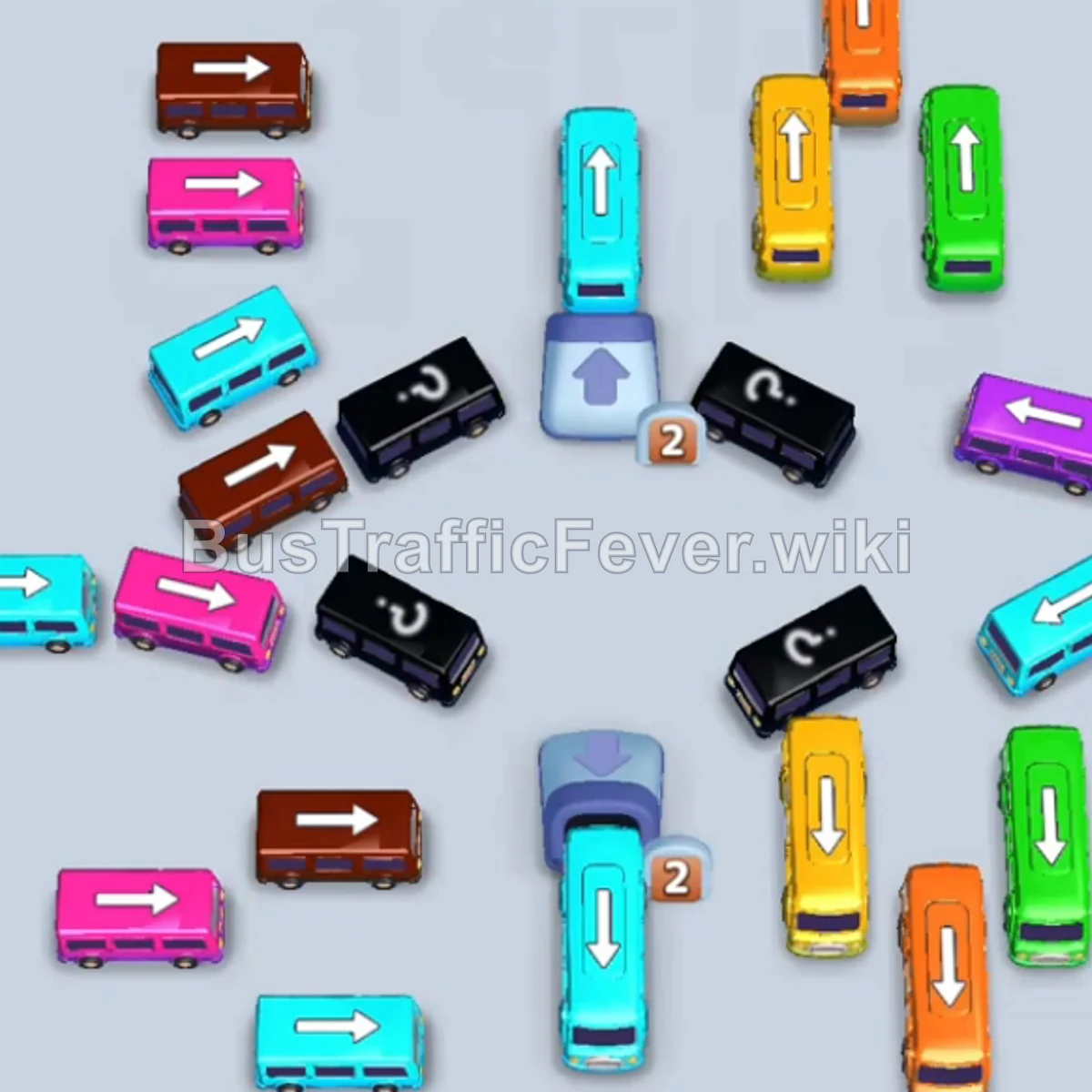
Tap the Cyan bus on the top-left pointing downward. It occupies the first parking slot to pick up cyan passengers. Tap the Yellow bus on the top-right pointing upward. Yellow passengers will begin boarding. Tap the Orange bus in the upper-right pointing upward.
Step-by-step solution
Phase 1: Clearing Upper Buses & Immediate Crowds
- Tap the Cyan bus on the top-left pointing downward. It occupies the first parking slot to pick up cyan passengers.
- Tap the Yellow bus on the top-right pointing upward. Yellow passengers will begin boarding.
- Tap the Orange bus in the upper-right pointing upward. Orange passengers will board simultaneously.
- Once all three buses are filled, they will clear out of the parking slots.
- Tap the Cyan bus in the center pointing upward. Cyan passengers will board and clear it.
- Tap the Green bus on the top-right pointing upward to board and clear the green passenger wave.
Phase 2: Clearing Mid-Grid Long Buses
- Tap the Orange bus near the bottom-right pointing upward. Orange passengers will board and clear it.
- Tap the Cyan bus on the middle-left pointing right.
- Tap the Yellow bus on the bottom-right pointing upward.
- Tap the Orange bus at the top-right pointing downward.
- Cyan, orange, and yellow passengers will board their respective vehicles in sequence and clear the slots.
- Tap the Green bus in the center pointing upward. Green passengers will board and exit.
Phase 3: Unravelling Multi-Color Layers
- Tap the Orange bus on the middle-right pointing downward.
- Tap the Yellow bus on the middle-right pointing upward.
- Tap the Pink bus on the bottom-left pointing right.
- Tap the Brown bus on the middle-left pointing right.
- Brown, pink, orange, and yellow passengers will board the parked vehicles and clear them one by one.
- Tap the Brown bus on the lower middle-left pointing right to collect the next brown group.
Phase 4: Final Sequence & Mystery Clearance
- Tap the Cyan bus on the bottom-left pointing left. Cyan passengers will begin boarding.
- Tap the Pink bus on the middle-left pointing left.
- Tap the Cyan bus on the middle-right pointing right. Pink and cyan passengers will board and exit.
- Tap the Purple bus on the far left pointing upward.
- Tap the Pink bus at the bottom-left pointing left. Pink passengers will board and clear it.
- Tap the Purple bus on the middle-right pointing right.
- Tap the Brown bus on the top-left pointing left. Brown passengers will board and leave.
- Tap the Cyan bus on the bottom-left pointing right.
- Finally, tap the Purple bus in the center pointing right. All remaining cyan and purple passengers will board to complete the level!
Tips for success
- Synergize Simultaneous Boarding: In Phases 1 and 3, sending out multiple matching buses at the same time allows overlapping color segments on the passenger track to clear much faster.
- Keep Central Passages Clear: The central numeric block prevents several vehicles from moving until neighboring buses are dispatched. Clear buses around the center to unlock the remaining grid.
- Track Purple Passengers for the Finale: Purple passengers appear primarily at the end of the queue. Save your purple vehicles until the late-game rush to avoid clogging parking slots early on.
More Bus Traffic Fever help
Continue with the Level 111 walkthrough, review the core rules in how to play Bus Traffic Fever, or browse all level solutions to jump to another number.