Bus Traffic Fever Level 360 Answer & Walkthrough Solution

Quick answer
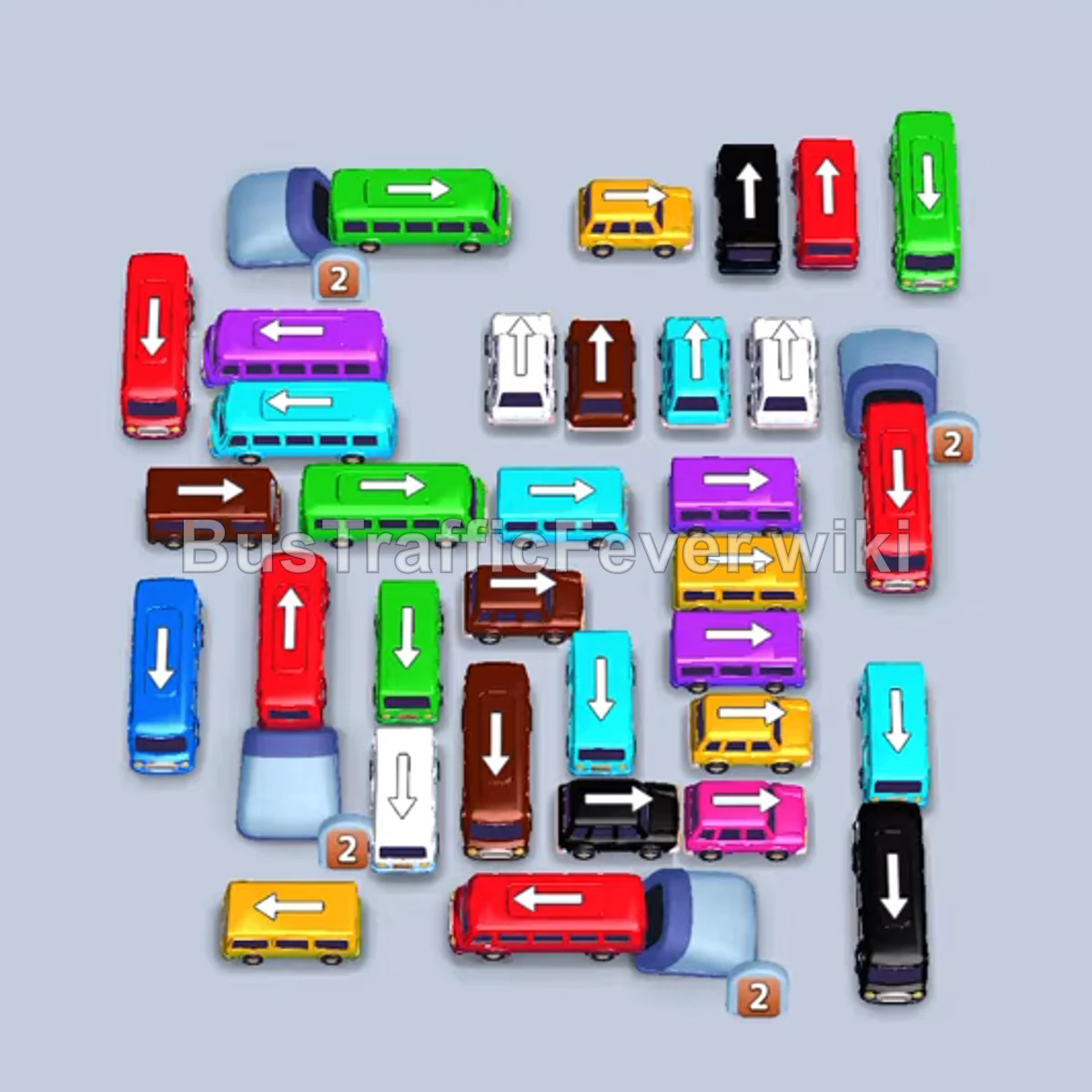
The primary challenge of Level 360 lies in the tight bottleneck created by numerous interlocking vertical and horizontal vehicles, as well as multiple red buses stacked behind one another. The winning strategy requires immediately deploying the unblocked buses and horizontal vehicles at the bottom and right edges to clear the black and cyan passenger waves. You will then strategically hold a black bus, dark blue bus, and light blue bus in idle slots while cycling matching vehicles through the VIP and remaining parking spaces until the board opens up for the massive red bus rush and final sweeps.
Step-by-step solution
Phase 1: Opening the Board & Clearing Initial Black and Cyan Waves
- Tap the vertical black bus at the bottom-right corner (pointing down) to enter the first parking slot and absorb the black passengers.
- Tap the horizontal cyan bus in the upper-middle section (pointing right) to take the second slot.
- Tap the bottom-most horizontal red bus (pointing right) to park in the third slot.
- Tap the second horizontal red bus located just above the bottom-most red bus (pointing right) to take the fourth slot. Both red buses will wait while earlier passenger colors board.
- Tap the horizontal cyan bus in row 2 on the left (pointing left) once the black and cyan buses clear, loading the remaining cyan passengers.
Phase 2: Utilizing the VIP Slot & Parking Holding Vehicles
- Tap the vertical black bus in the top row (pointing up) into the first gray parking slot to hold for later black passengers.
- Tap the vertical dark blue bus in row 2 (pointing up) into the second parking slot to hold for later blue passengers.
- Tap the vertical white bus in row 2 (pointing up) into the VIP slot on the left to immediately service the white passengers.
- Tap the vertical white bus in row 4 (pointing down) into the VIP slot once the first white bus departs.
- Tap the horizontal purple/magenta bus on the middle-right (pointing right) into the VIP slot to board the incoming purple passengers.
- Tap the vertical yellow bus in the upper-right section (pointing up) into the VIP slot to clear the short yellow passenger group.
- Wait for the two red buses sitting in slots 3 and 4 to finish boarding the large wave of red passengers and depart, opening two main parking spaces.
Phase 3: Cycling Green, Brown, and Mid-Stage Vehicles
- Tap the horizontal green bus at the top-left corner (pointing left) to enter slot 3 and collect green passengers.
- Tap the vertical green bus at the top-right corner (pointing up) into slot 4.
- Tap the horizontal green bus in row 3 (pointing left) into slot 4 once the previous bus departs.
- Tap the vertical brown bus in row 4 (pointing down) into slot 3 to absorb the brown passenger group.
- Tap the horizontal light blue bus in row 3 (pointing left) into the VIP slot to hold for later.
- Tap the horizontal purple bus in row 3 (pointing right) into slot 4 for the next purple passenger wave.
- Tap the horizontal yellow bus in row 3 (pointing right) into slot 4 to pick up yellow passengers.
- Tap the vertical brown bus in the top row (pointing up) into slot 3.
- Tap the horizontal pink bus near the bottom-right (pointing right) into slot 3.
- Tap the vertical red bus in the center column (pointing down) into slot 3 to load the mid-level red passenger group.
Phase 4: Clearing Yellow, Green, and Freeing the Stored Vehicles
- Tap the vertical green bus on the upper-right edge (pointing up) into slot 4 to service green passengers.
- Tap the vertical yellow bus in row 4 (pointing down) into slot 4 to take the next yellow passenger group.
- Tap the horizontal pink bus near the bottom (pointing left/down) into slot 4 to pick up pink passengers.
- Tap the vertical green bus on the left side (pointing down) into slot 4 to finish the remaining green passengers.
- Allow the holding vehicles to clear: The passenger queue will now cycle through black, cyan, and dark blue, completely clearing the black bus in slot 1, the cyan bus in the VIP slot, and the dark blue bus in slot 2.
Phase 5: Processing the Main Color Waves
- Tap the vertical purple bus on the left (pointing down) into slot 1 to absorb the full purple wave.
- Tap the vertical brown bus in the center column (pointing down) into slot 1 to board the large brown passenger group.
- Tap the vertical cyan bus in the lower-center area (pointing down) into slot 1 to pick up the incoming cyan group.
- Tap the vertical black bus near the bottom-center (pointing down) into slot 1.
- Tap the vertical black bus in the top row (pointing up) into slot 2 to finish the black passenger group.
- Tap the vertical yellow bus in the top row (pointing up) into slot 3 to board yellow passengers.
- Tap the vertical yellow bus in the center column (pointing down) into slot 3 to finish the yellow group.
Phase 6: The Red Bus Chain & Final Clearance
- Tap the vertical red buses in sequential order as each boards and leaves slot 1:
- The two vertical red buses in the top row (pointing up).
- The vertical red buses in the left and center columns (pointing down) one after another until seven small red buses have cycled through.
- Tap the vertical red bus on the left (pointing down) into slot 1 to board the final remaining red passengers.
- Tap the vertical white bus (pointing up) into slot 2 to board white passengers.
- Tap the horizontal yellow bus (pointing right) into slot 3 to pick up yellow passengers.
- Tap the horizontal green bus (pointing left) into slot 4 for the remaining green passengers.
- Tap the horizontal yellow bus (pointing right) into slot 1 to finish all yellow passengers.
- Tap the vertical white bus (pointing down) into slot 3 to clear the last white passengers.
- Tap the horizontal brown bus (pointing right) into slot 4 to clear the brown passenger wave.
- Tap the vertical purple bus (pointing down) into slot 1 to clear the purple passengers.
- Tap the vertical brown bus (pointing up) into slot 3.
- Tap the vertical cyan bus (pointing up) into slot 2.
- Tap the final vertical cyan bus (pointing down) into slot 1 to collect the last passengers and complete the level.
Tips for success
- Patience with Red Buses: The two red buses sent out at the very beginning will block slots 3 and 4 for a long time. Do not panic; use the VIP slot and slots 1 and 2 to cycle quick buses while waiting for the red passenger wave.
- Controlled Holding: Placing the black and dark blue buses into slots 1 and 2 early on is essential to unblock vehicles behind them. Ensure you leave the VIP space free for immediate-fill buses while these two sit idle.
- Red Bus Rush: Once the board clears down to the stacked red buses, send them into the freed slots one by one. Their 4-passenger capacity clears them quickly without risk of jamming.
More Bus Traffic Fever help
Continue with the Level 359 walkthrough, review the core rules in how to play Bus Traffic Fever, or browse all level solutions to jump to another number.