Bus Traffic Fever Level 64 Answer & Walkthrough Solution

Quick answer
Level 64 takes careful sequencing to clear. Follow the phased order below, from “Clearing the Bottom Red Wall & Initial Passenger Waves” through to “Final Sequence & Top-Row Yellow Clear”. Watch the capacity numbers on the larger buses and don’t stage a color until its queue is close to the front.
Step-by-step solution
Phase 1: Clearing the Bottom Red Wall & Initial Passenger Waves
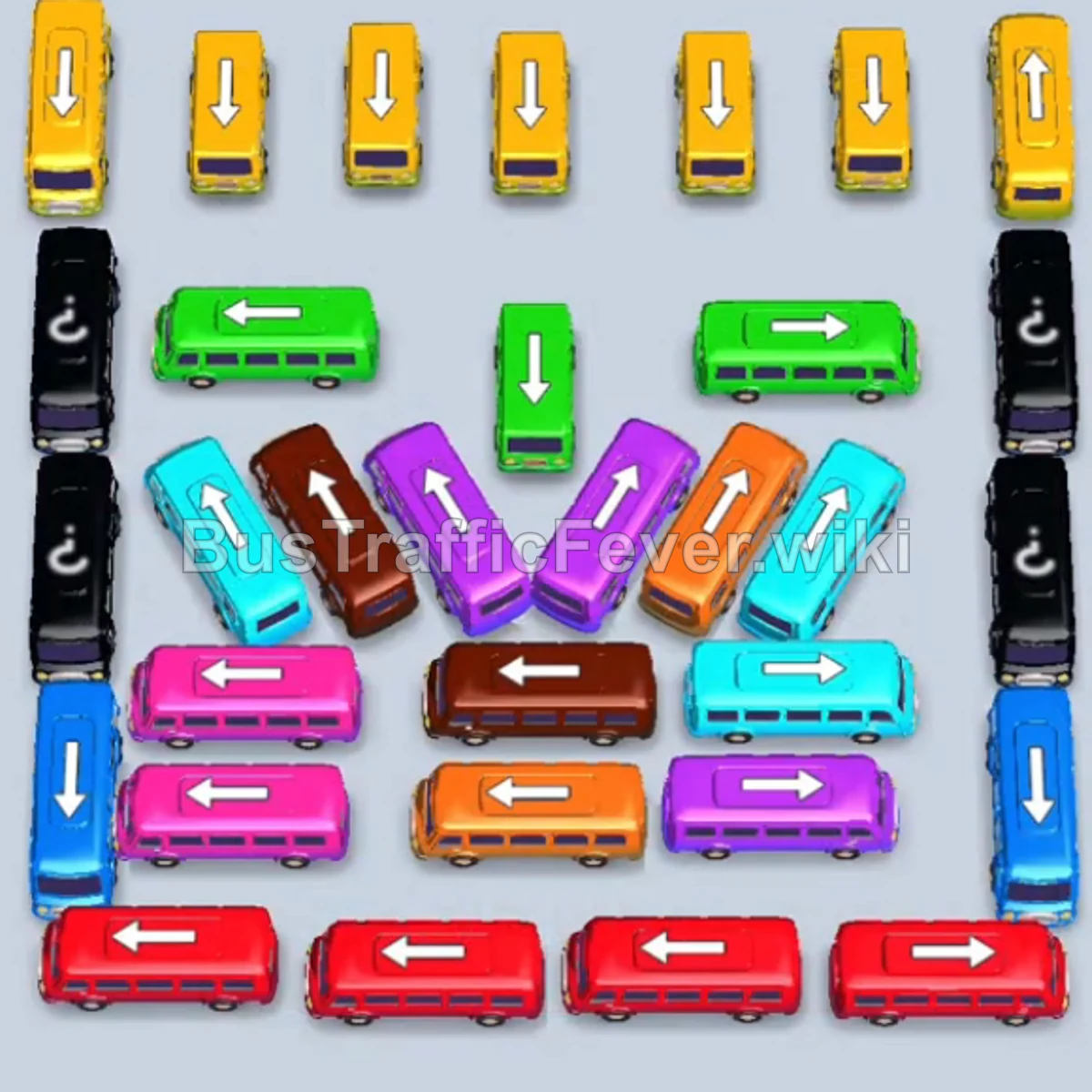
- Tap the Red bus (capacity 40) on the bottom-left facing up. Red passengers board and it departs immediately.
- Tap the Red bus (capacity 40) on the bottom-right facing right. Red passengers board and it leaves.
- Tap the Red bus (capacity 40) on the lower-right facing right. Red passengers board and it departs.
- Tap the Red bus (capacity 40) at the bottom-center facing left. It collects the final red passengers of the first wave and clears.
- Tap the Blue bus (capacity 40) in the lower-middle facing right into parking slot 1.
- Tap the Pink bus (capacity 40) on the middle-left facing down into slot 2. Pink passengers board and it departs.
- Blue passengers now board the parked Blue bus in slot 1, allowing it to leave.
Phase 2: Unlocking the Left & Right Bottlenecks
- Tap the Orange bus (capacity 40) at the bottom-center facing left into slot 1. Orange passengers board and it departs.
- Tap the Blue bus (capacity 40) on the lower-left facing down into slot 1.
- Tap the Pink bus (capacity 40) in the lower section facing left into slot 2. Pink passengers board and it departs.
- Blue passengers board the parked Blue bus in slot 1, and it departs.
- Tap the Orange bus (capacity 40) on the bottom-left facing up into slot 1.
- Tap the Green bus (capacity 40) on the middle-left facing down into slot 2. Green passengers board and it clears.
- Tap the Yellow bus (capacity 40) on the bottom-left facing down into slot 2. Yellow passengers board and it departs.
Phase 3: Managing Dense Multi-Color Middle Vehicles
- Tap the Blue bus (capacity 40) on the far-right facing up into slot 2.
- Tap the Orange bus (capacity 40) on the bottom-left facing down into slot 3.
- Tap the Red bus (capacity 40) on the far-right facing down into slot 4. Red passengers board and it departs.
- Tap the Purple bus (capacity 40) on the far-right facing up into slot 4. Purple passengers board and it clears.
- Tap the Green bus (capacity 40) on the far-right facing down into slot 4. Green passengers board and it departs.
- Tap the Cyan bus (capacity 40) on the middle-left facing down into slot 4. Cyan passengers board and it clears.
- Orange passengers board the parked Orange bus in slot 1 and it departs.
- Tap the Brown bus (capacity 40) on the middle-left facing left into slot 1. Brown passengers board and it leaves.
- Brown passengers finish boarding the remaining vehicle in slot 3 and it clears.
- Tap the Cyan bus (capacity 40) on the bottom-right facing left into slot 1. Cyan passengers board and it departs.
- Tap the Purple bus on the middle-left facing up into slot 3.
- Orange passengers finish boarding the parked Orange bus in slot 2 and it departs.
Phase 4: Final Sequence & Top-Row Yellow Clear
- Tap the Yellow bus (capacity 40) in the top-left row (1st column) facing down into slot 1.
- Tap the Cyan bus (capacity 40) on the bottom-right facing left into slot 3. Cyan passengers board and it departs.
- Yellow passengers board the parked Yellow bus in slot 1 and it clears.
- Tap the Yellow bus (capacity 40) in the top row (2nd column) facing down into slot 1.
- Tap the Purple bus (capacity 40) in the center facing up into slot 3.
- Yellow and Purple passengers board their respective parked vehicles, and the Purple bus clears.
- Blue passengers board the parked Blue bus in slot 2 and it departs.
- Tap the Yellow bus (capacity 24) on the far-right facing up into slot 2. Yellow passengers board and it departs.
- Tap the Purple bus (capacity 40) in the center facing up into slot 1. Purple passengers board and it clears.
- Tap the Green bus (capacity 40) in the center facing down into slot 1.
- Tap the Orange bus (capacity 40) in the center facing up into slot 2. Orange passengers board and it departs.
- Tap the Yellow bus (capacity 24) in the top row facing down into slot 3.
- Green and Yellow passengers board their parked vehicles in slots 1 and 3 and depart.
- Tap the final Yellow bus (capacity 24) in the top row facing down into slot 1.
- The remaining yellow passengers board to achieve a Perfect Hard Level 64 clear!
Tips for success
- Dismantle the Red Wall First: The four horizontal red buses at the very bottom block almost the entire board. Use the opening red passenger wave to clear all four immediately.
- Pre-Park the 40-Capacity Blue & Orange Buses: Large buses take multiple passenger cycles to fill; parking them early on the left side ensures passenger queues never stall.
- Reserve Top Yellows for the End: The top-row yellow fleet faces straight down—keep their exit lanes clear until the bottom and middle clusters are cleared out.
More Bus Traffic Fever help
Continue with the Level 63 walkthrough, review the core rules in how to play Bus Traffic Fever, or browse all level solutions to jump to another number.