Bus Traffic Fever Level 340 Answer & Walkthrough Solution

Quick answer
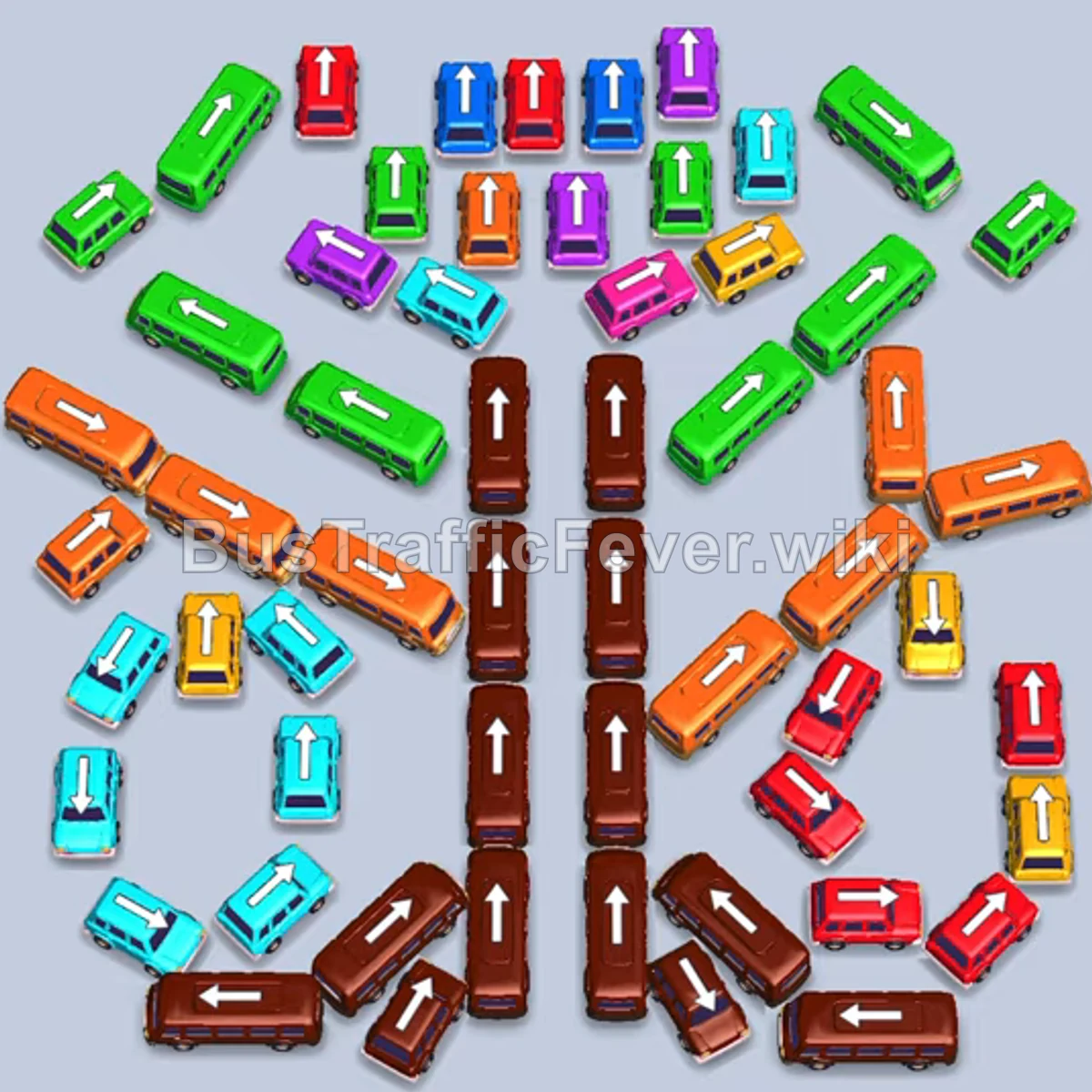
Level 340 features a symmetrical winged layout resembling a butterfly, anchored by a tall central spine of brown buses and buses flanked by diagonal wings of orange, green, cyan, red, and yellow vehicles. With only five initial parking slots, managing slot capacity is crucial against long alternating queues of orange, brown, green, and red passengers. The winning strategy focuses on clearing the diagonal wing buses early to handle the massive opening orange and green waves, progressively sending vehicles from the center vertical column as brown passengers appear, and steadily dismantling the lower corner clusters without overloading the parking bay.
Step-by-step solution
Phase 1: Clearing Outer Wings and Initial Queue (Orange, Green, and Brown)
- Tap the orange bus on the middle-right side (pointing left). It enters the parking bay, collects orange passengers, and leaves.
- Tap the green bus at the top right of the wing (pointing up) to enter parking.
- Tap the green bus on the upper-right diagonal (pointing down-left) into an open slot.
- Tap the green bus on the upper-left diagonal (pointing down-right).
- Tap the orange bus on the middle-right side (pointing up) to absorb the incoming orange queue and depart.
- Tap the orange bus on the upper-left diagonal (pointing up-left) into the freed slot to pick up the next orange passengers.
- Tap the brown bus at the top of the central column (pointing up). It boards the brown passengers that reach the front of the line and exits.
- Tap the yellow bus on the middle-right (pointing up) as yellow passengers appear. It fills up and departs quickly.
- Tap the green bus at the top of the upper cluster (pointing up) to board green passengers.
- Tap the red bus from the top row (pointing down).
- Tap the adjacent red bus from the top row (pointing up) to clear red passengers alongside the completed green buses.
Phase 2: Dismantling the Upper Cluster and Center Spine
- Tap the orange bus on the middle-left (pointing up-left) to clear the next orange wave.
- Tap the purple bus at the top center (pointing right) to board purple passengers.
- Tap the cyan bus on the upper left (pointing left) to board cyan passengers.
- Tap the second cyan bus nearby (pointing left) to finish the cyan group.
- Tap the purple bus at the top right (pointing left) to collect the remaining purple passengers and exit.
- Tap the brown bus from the upper-center vertical column (pointing up) to take the incoming brown queue.
- Tap the blue bus at the top left (pointing up).
- Tap the blue bus next to it (pointing up) to board the blue crowd.
- Tap the brown bus in the central column (pointing up) to collect the next brown wave and clear the slot.
Phase 3: Right Wing and Center Spine Progress
- Tap the green bus on the upper-left (pointing down-right) to hold a slot for upcoming green passengers.
- Tap the purple bus near the top (pointing up) to clear remaining purple passengers.
- Tap the red bus on the right side (pointing up) as red passengers arrive.
- Tap the red bus in the lower-right cluster (pointing left).
- Tap the brown bus from the upper-middle column (pointing up) to board brown passengers.
- Tap the red bus on the right side (pointing up) to board incoming red passengers and depart.
- Tap the brown bus moving up the central column (pointing up) to absorb the brown wave and depart.
Phase 4: Clearing the Left Wing and Inner Clusters
- Tap the brown bus in the lower central column (pointing up) to board brown passengers.
- Tap the yellow bus in the lower-right area (pointing up) to pick up yellow passengers.
- Tap the red bus in the lower-right corner (pointing left).
- Tap the cyan bus on the mid-left wing (pointing right).
- Tap the orange bus on the far-left wing (pointing up-left). It boards the large group of orange passengers and exits.
- Tap the orange bus from the left wing to finish the remaining orange passengers.
- Tap the cyan bus on the lower-left wing (pointing down-left).
- Tap the green bus on the left wing (pointing down-right) to board green passengers and depart.
Phase 5: Final Clean-up
- Tap the brown bus in the lower-right corner (pointing left) to finish the brown queue.
- Tap the red bus in the lower-right area (pointing left) to clear red passengers.
- Tap the green bus at the top (pointing left) to take the green crowd.
- Tap the yellow bus from the right side (pointing up) to clear yellow passengers.
- Tap the orange bus on the left side to collect the final orange passengers.
- Tap the remaining cyan buses from the lower-left cluster to clear cyan passengers.
- Tap the final green bus to pick up the last passengers and complete the level.
Tips for success
- Clear the central brown spine in rhythm: The vertical brown column contains numerous buses and buses stacked end-to-end. Only release a brown vehicle when brown passengers are either boarding or within the next 2–3 passengers in line.
- Unlock trapped diagonal buses early: Releasing the large diagonal buses on the upper wings unblocks multiple smaller buses underneath, giving you the flexibility needed to match unpredictable queue segments.
- Keep at least one slot open for quick buses: Four-passenger buses clear quickly if matched correctly; keeping a buffer slot open prevents gridlock when two large buses are waiting for their passenger groups to cycle through.
More Bus Traffic Fever help
Continue with the Level 339 walkthrough, review the core rules in how to play Bus Traffic Fever, or browse all level solutions to jump to another number.