Bus Traffic Fever Level 132 Answer & Walkthrough Solution

Quick answer
Tap the Orange bus on the far outer-left wing. It parks in the first slot, loads 40 Orange passengers, and departs. Tap the Cyan bus on the outer-left wing to park in slot 1. Tap the Cyan bus on the lower-left wing to park in slot 2.
Step-by-step solution
Phase 1: Clearing Outer Loops & Early Queue Flow
- Tap the Orange bus on the far outer-left wing. It parks in the first slot, loads 40 Orange passengers, and departs.
- Tap the Cyan bus on the outer-left wing to park in slot 1.
- Tap the Cyan bus on the lower-left wing to park in slot 2.
- Tap the Cyan bus at the bottom left to park in slot 3.
- Tap the Orange bus on the middle-right wing. It fills with Orange passengers and leaves.
- Tap the Orange bus on the far left. It collects the next Orange group and departs.
- Tap the Brown bus on the far-right wing. It collects Brown passengers and leaves.
- Tap the Brown bus on the outer-right wing. It picks up Brown passengers and leaves.
- Tap the Cyan bus on the outer-left wing to park in slot 1.
- The queue shifts to Cyan: the parked Cyan buses and buses in the waiting slots automatically board Cyan passengers and depart one after another.
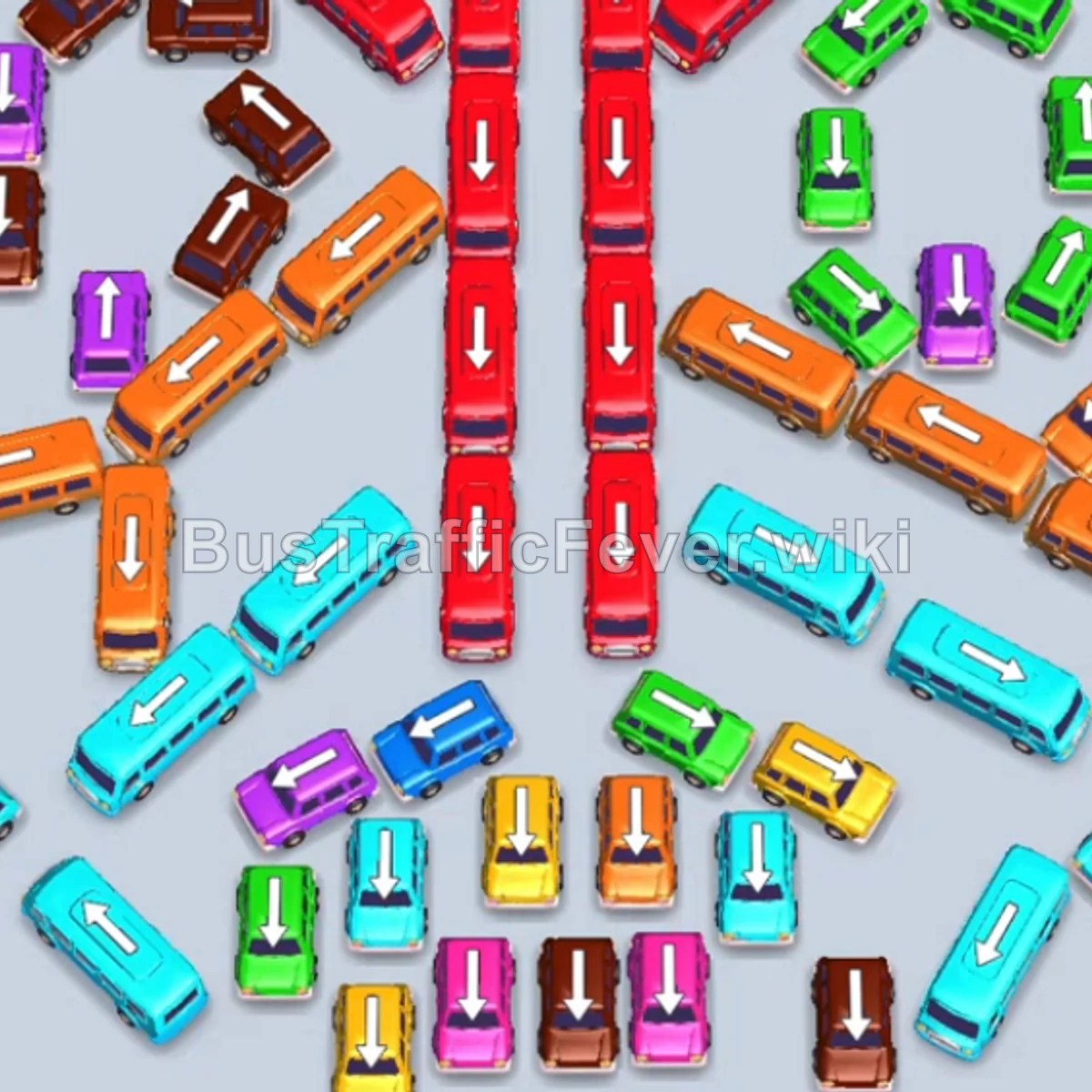
Phase 2: Clearing the Center Spine & Lower Row
- Tap the Orange bus on the left side. It boards Orange passengers and departs.
- Tap the Purple bus on the left side to pick up Purple passengers and depart.
- Tap the Green bus in the bottom row (middle-left). It collects Green passengers and leaves.
- Tap the Red bus in the center vertical spine. It collects Red passengers and leaves.
- Tap the Pink bus at the bottom left to hold in slot 1.
- Tap the Yellow bus at the bottom (inner-left). Yellow passengers board and it departs.
- Tap the Cyan bus in the lower-middle area to park in slot 2; Cyan passengers board and it departs.
- Tap the Yellow bus at the bottom (inner-right). It boards Yellow passengers and leaves.
- Tap the Red bus in the center vertical column. It collects Red passengers and departs.
- Tap the next Red bus in the center vertical column. It picks up Red passengers and leaves.
- Tap the bottom-most Red bus in the vertical spine. It collects Red passengers and leaves.
- The Pink bus previously parked in slot 1 now fills with Pink passengers and departs.
Phase 3: Clearing the Left Wing & Upper Left Vehicles
- Tap the Pink bus in the bottom row (middle-right). It boards Pink passengers and leaves.
- Tap the Orange bus on the far left. It boards Orange passengers and departs.
- Tap the Green bus in the bottom row (inner-left) into slot 1.
- Tap the Red bus at the top of the middle column. Red passengers board and it departs.
- Tap the Yellow bus in the bottom row. It collects Yellow passengers and departs.
- Tap the Red bus on the upper-left side. It picks up Red passengers and leaves.
- Tap the Brown bus on the inner-left wing. It collects Brown passengers and leaves.
- Tap the Purple bus on the left wing. It picks up Purple passengers and leaves.
- Tap the Brown bus on the left wing. It picks up Brown passengers and leaves.
- Tap the Red bus in the bottom row. It picks up Red passengers and leaves.
- Tap the Brown bus on the left wing. It picks up Brown passengers and departs.
- Tap the Red bus on the upper left. It collects Red passengers and leaves.
- Tap the Red bus on the top left. Red passengers board and it departs.
Phase 4: Clearing the Upper Flank & Right Wing
- Tap the Red bus at the top right. It boards Red passengers and leaves.
- Tap the Red bus on the upper left. It boards Red passengers and leaves.
- Tap the Red bus in the upper-middle area. It boards Red passengers and leaves.
- Tap the Red bus on the upper left. It picks up Red passengers and departs.
- Tap the Purple bus on the left wing. It boards Purple passengers and leaves.
- Tap the Brown bus on the left wing. It boards Brown passengers and departs.
- Tap the Green bus on the right wing. It boards Green passengers and leaves.
- Tap the Orange bus on the lower-right wing. It boards Orange passengers and departs.
- Tap the Green bus on the right wing. It boards Green passengers and leaves.
- Tap the Orange bus on the right wing. It boards Orange passengers and leaves.
- Tap the Orange bus on the left. It boards Orange passengers and leaves.
- Tap the Green bus on the right wing. It boards Green passengers and departs.
- Tap the Cyan bus from the field to pick up the incoming Cyan passengers and depart.
Phase 5: Final Cleanup & Level Completion
- Tap the Cyan bus at the bottom to park in slot 1.
- Tap the Purple bus on the right to park in slot 2.
- Tap the Green bus on the right to park in slot 3.
- Purple and Green passengers board their respective buses and depart.
- Tap the Red bus on the left to park in slot 2; Red and Cyan passengers board and both vehicles depart.
- Tap the Cyan bus on the left into slot 1.
- Tap the Brown bus on the left into slot 2.
- Tap the Green bus on the right into slot 3. Passengers board and vehicles depart.
- Tap the Orange bus on the bottom right to collect the final Orange passengers.
- Tap the Cyan bus and the remaining Green bus to clear all remaining passengers and complete the level!
Tips for success
- Observe the Queue: Always check the color sequence of passengers at the top to clear matching vehicles or pre-stage vehicles that will be needed shortly.
- Stage Large Capacity Buses: Storing Cyan buses early allowed them to instantly clear a huge block of Cyan passengers once they reached the front of the line.
- Prioritize Blocking Vehicles: Target vehicles in the central column and inner loops early to open up movement paths for the rest of the board.
More Bus Traffic Fever help
Continue with the Level 131 walkthrough, review the core rules in how to play Bus Traffic Fever, or browse all level solutions to jump to another number.