
Bus Traffic Fever Stuck? Why Buses Are Not Moving
First identify where the bus stopped: inside the grid, in a waiting bay, or after a step that should have freed space. Check its arrow path, the leading passenger color, and the previous departure condition. If your starting board differs from the walkthrough, compare layouts before following its order.
What should you check when a Bus Traffic Fever level gets stuck?
Identify the stalled part of the puzzle before tapping again. A bus blocked inside the grid needs a different check from a bus waiting for passengers. Adding another bus without identifying the problem can use the bay needed to recover the sequence. Start with the symptom that matches your screen.
| What you see | First check | What to compare next |
|---|---|---|
| A bus stays in the grid | Its arrow direction and the bus in front | The intended bus’s position in the guide |
| A bus waits in a bay | The leading passenger color | The waves before its own color |
| The next bus has no space | Which parked bus should leave first | The last waiting condition in the solution |
| The written order stops matching | The earliest different board state | A missed dispatch or departure |
| The opening already looks different | Starting bus positions and directions | The guide screenshot and video |
If you need the controls first, read how to play Bus Traffic Fever. This page diagnoses puzzle states; it does not establish whether an unresponsive app has a software fault.
Why will a bus not leave the grid?
Check the arrow path and confirm you selected the intended bus. Another bus in front may prevent movement even when a waiting bay is available. Several buses can share a color, so use position and direction together. A color-only reading of the solution can send you to the wrong one.
The Level 3 walkthrough provides a simple blocking example: after the early Yellow and Blue sequence, the central Yellow bus moves into an empty slot to open access to Red buses behind it. The solution includes a temporary parking move because the needed color is not yet accessible.
Before moving a blocker, check where it will wait. Clearing a path is useful only if you can still bring out the bus needed next. For more detailed planning, read the bus-order and parking strategy.
Why is a parked bus not picking up passengers?
Compare the waiting bus with the passengers at the front, not just a matching group further back. The bus may be waiting through earlier waves rather than failing to work. Check whether the written walkthrough expects that wait, and whether the other bays still let you serve the intervening colors.
In Level 327, the opening Yellow bus waits in slot 1. Cyan and Blue buses serve earlier passengers, and another Cyan uses the space released by Blue. The Yellow bus does not fill and leave until the later yellow wave described in the next phase.
This example gives you a diagnostic question: is the waiting bus part of the intended sequence, or did I send it instead of the bus that should be loading now? Do not assume every early bus must leave before a later one.
What if the next bus has no free parking slot?
Return to the last departure condition before adding another bus. The next written action may depend on a specific bay becoming free. If that event has not happened, you are not yet at the next step, even if the correct bus is visible and its path out of the grid is clear.
The Level 303 opening explicitly waits for blue and yellow passengers to clear before another Yellow dispatch. Later, it waits for Cyan and Orange buses to fill and depart. Skipping a wait changes the available space for everything that follows.
If none of the parked buses can serve the leading passengers and no bay is available for the required bus, compare your earlier dispatches with the guide. Waiting longer by itself does not correct a missing color. This diagnosis does not prove that a booster is required or that the level is impossible.
How can you find where an attempt went wrong?
Compare the last matching board state rather than restarting your reasoning from the end of the list. Record the parked colors, the leading passengers, and the bus that most recently departed. Then check the next action in the guide. These observations help separate a wrong bus from a missed waiting condition.
Use the level video to check one transition at a time. If hidden buses have just appeared, compare their newly visible colors and paths before continuing; the mystery-bus guide explains what to inspect after a reveal.
What if your board does not match the walkthrough?
Compare bus positions, arrow directions, and distinctive obstacles before using the tap order. A matching level number is not enough to establish that two layouts are identical. If the starting boards differ, the linked solution may not apply to your current screen; do not substitute colors and assume the rest still works.
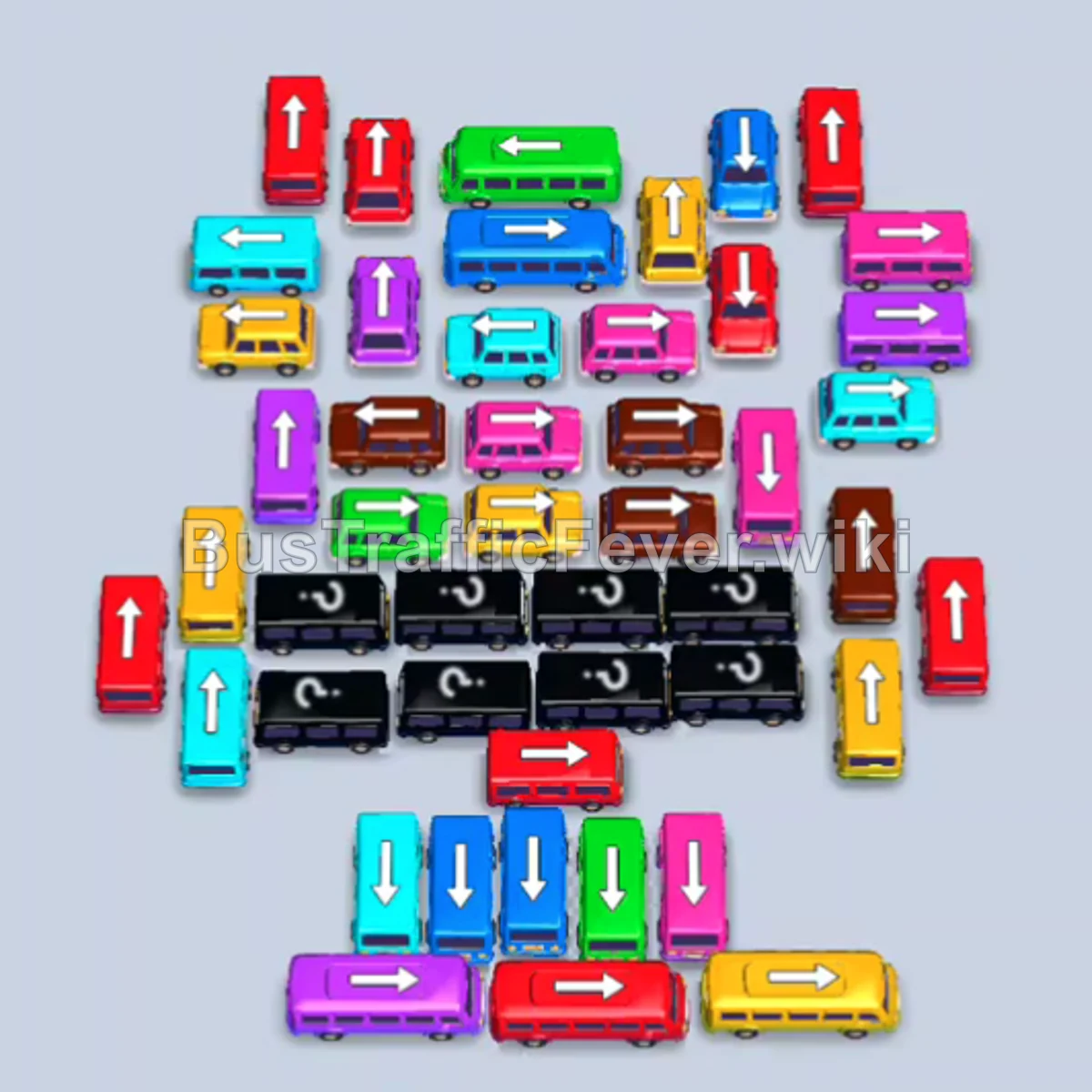
For example, the Level 370 screenshot has upward-facing Red buses near the upper left and rows of question-mark buses below the center. Those are useful comparison landmarks, not a universal layout for every version of that level.
Find your number in the Bus Traffic Fever walkthrough directory and check its screenshot and video. If the app itself is frozen, distinguish that from a blocked puzzle move before treating a dispatch-order guide as the answer.
Related Levels
guides
Bus Traffic Fever Mystery Buses: Question-Mark Board Guide
Learn how to read question-mark buses in Bus Traffic Fever, separate hidden colors from blocked paths, and recheck your plan after buses are revealed.
guides
Bus Traffic Fever Hardest Levels: Hard & Super Hard Guide
Find Hard and Super Hard Bus Traffic Fever walkthroughs, including levels above 300, with opening moves and examples of parking and queue challenges.
guides
Bus Traffic Fever Tips and Tricks: Bus Order & Parking Strategy
Practical Bus Traffic Fever tips and tricks for choosing buses, managing parking slots, and reading passenger queues, with examples from level walkthroughs.